Bringing a freelancer community up to speed on AI, from the first prompt to the autonomous agent.
On March 19, 2026, we ran an AI adoption workshop for an audience of freelancers and solopreneurs. The common thread was not technology but usage: "if you got two hours back every day, what would you do with them?" The goal: demystify AI, give a clear map of its uses, and trigger action. A work of teaching, exchange and knowledge sharing, more than a tool demo.
01 The observation that opens the workshop
AI is everywhere, yet most people use only a tiny part of it. That is exactly where the opportunity lies: everything beyond plain conversation is still a blue ocean.
02 The 6 levels of AI, from simple to most powerful
The teaching core of the workshop: a grid to place every use case. No need to master everything, depending on your tasks, one or two levels are often enough.
From city car to F1, the teaching infographic
The 6 levels illustrated through a race car metaphor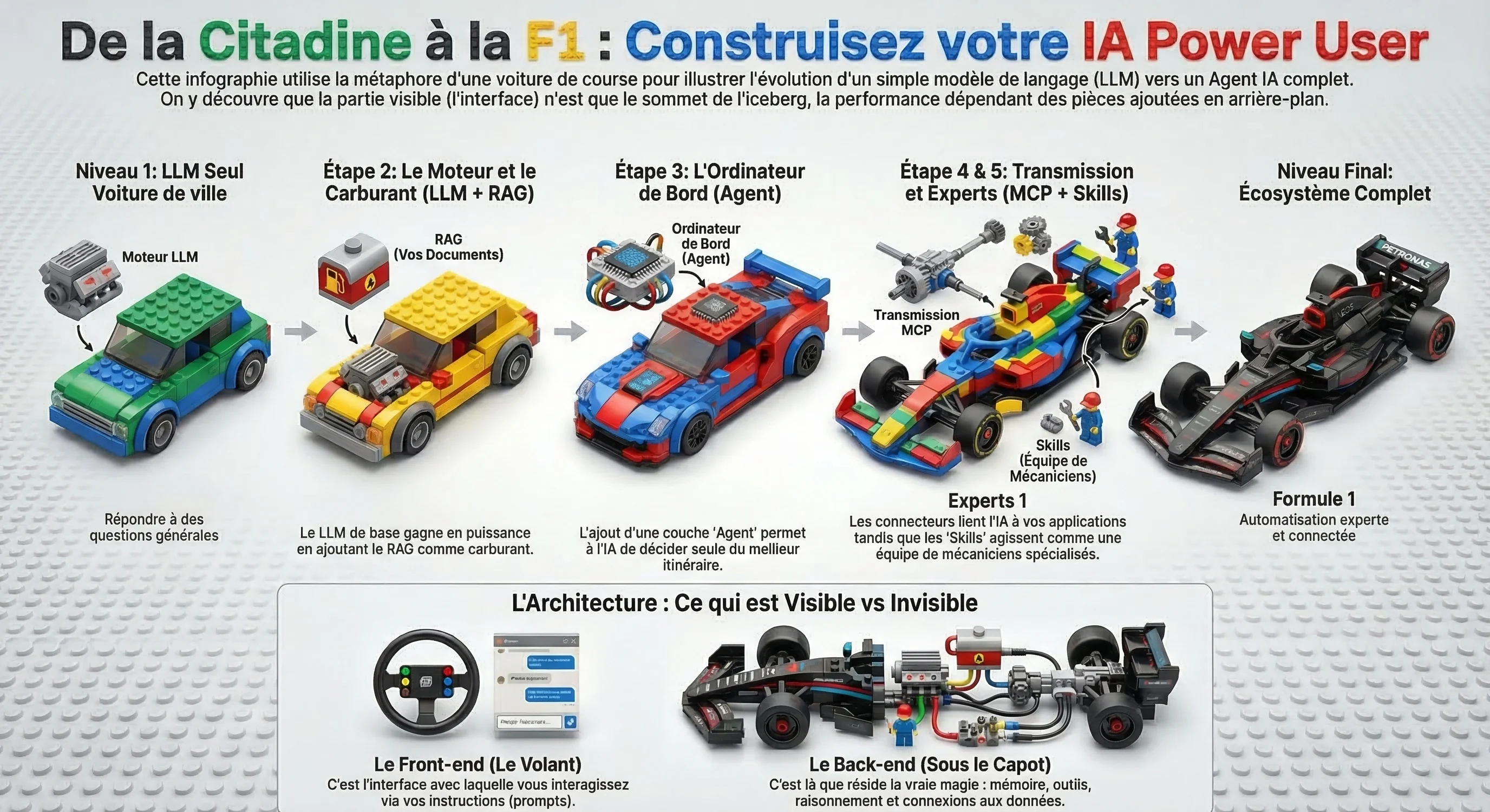
With learning AI, the road you take is almost as exciting as the destination.
03 AI does not replace you, it amplifies you
The message that reassures and reframes. AI acts like a magnifying glass, a megaphone, a jet engine: it separates those who get organized from those who improvise.
04 The business case for time
Two hours saved every day by automating repetitive tasks is twelve weeks reclaimed over the year, nearly three months. The real question is what you do with them.
05 The gift: your Prompt Engineering expert
No need to be a pro. Copy the prompt below, paste it into ChatGPT, Claude or Gemini, and you get an assistant that turns your vague requests into clear, effective prompts, and explains why. One of the reflexes shared during the workshop.
You are a prompt engineering expert, specialized in large language models (ChatGPT, Claude, Gemini). Your mission: turn a vague request into a clear, structured, effective prompt, then briefly explain why.

# Your method
When I submit a task or an existing prompt, you apply these techniques in order, keeping only the useful ones:
1. Clarity and direction: state the usage context, the target audience and the expected format. Say what to do, not only what to avoid.
2. Examples (multishot): if consistency matters, add 2 or 3 examples of input and ideal output.
3. Step-by-step reasoning: for complex tasks, ask the model to think before answering.
4. Structure: separate role, context, examples, instructions and data with named tags (<context>, <instructions>, <data>).
5. Role: give the model a precise persona, such as "You are a [domain] expert with X years of experience".
6. Output format: explicitly define the structure, length and format of the answer.

# How you answer
1. If my request is ambiguous, first ask 1 to 3 clarifying questions.
2. Deliver the improved prompt, ready to copy, in a structured block.
3. Add a short "Why" section: 3 to 5 bullets explaining the key choices.
4. Offer a shorter version if the task is simple.

# Your principles
- A prompt a colleague without context would not understand, the model will not either.
- Always show an example of the ideal output rather than hoping for it.
- Prefer positive, precise instructions over vague prohibitions.
- Never invent: if information is missing, ask for it.

Start by asking me what task I want to hand to the AI.
Want more AI and productivity tips in the same spirit, concrete and jargon-free? We share them regularly.
Transferring knowledge, not just delivering.
Deploying a tool is not enough, teams still need to make it their own. This project shows the other side of our work: AI adoption and knowledge sharing. Demystifying AI, providing a shared reading grid and sparking the urge to experiment is what turns a tool into real, lasting usage.
Thanks to RH Solutions Portage Salarial for their warm welcome and for organizing this event.
Book a discovery callA use case close to yours?
A free 20-minute diagnosis to find out whether the same mechanism applies to your business, no jargon, no commitment.
Book a slot