
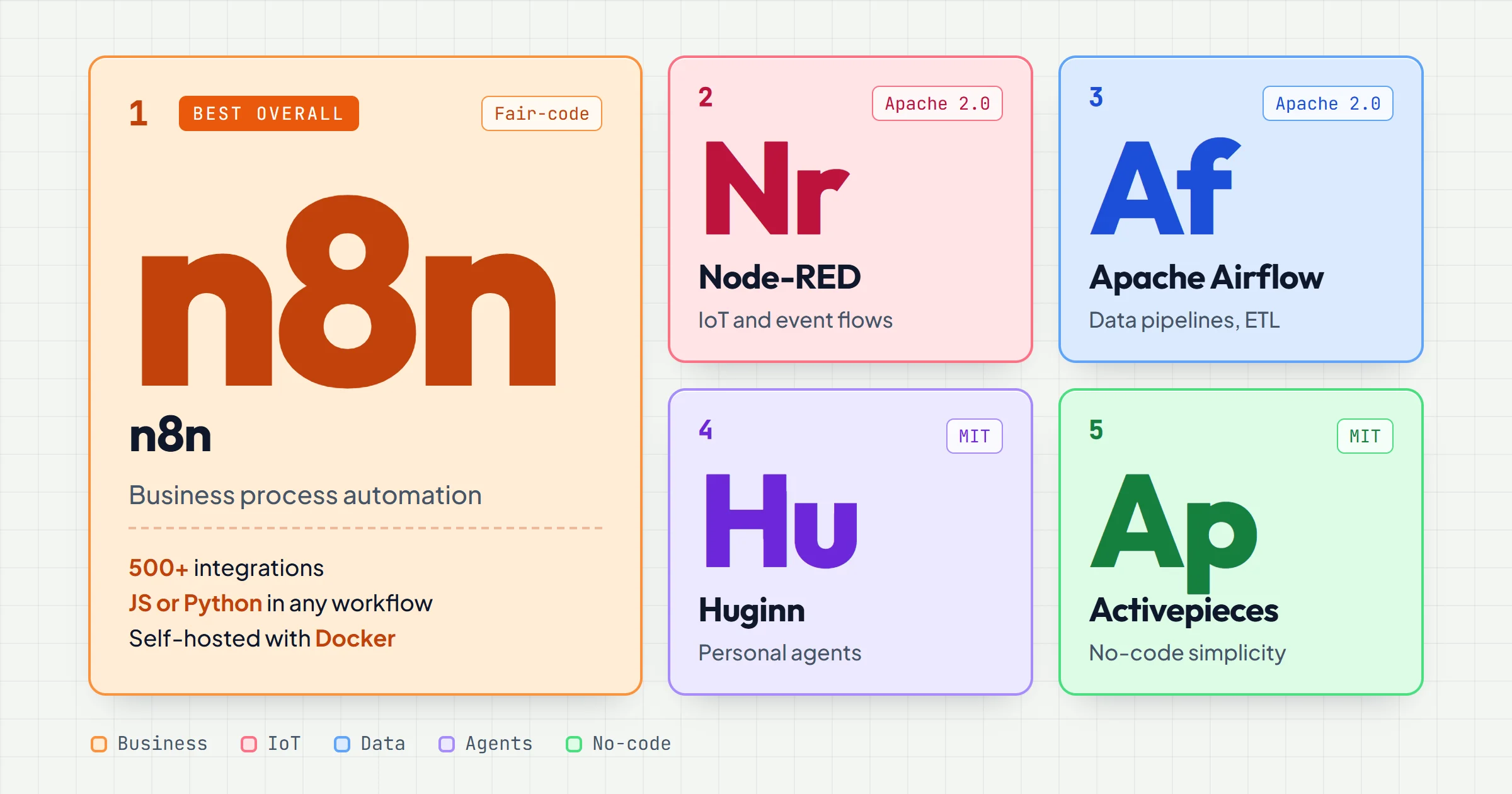
If you're evaluating open source workflow automation tools, you likely want to avoid recurring subscription costs, keep your data on your own infrastructure, and customize workflows beyond what closed platforms allow. This comparison focuses on tools that are genuinely open source, actively maintained, and suitable for business process automation in small to medium enterprises. We'll cut through the hype and give you a direct verdict.
Verdict: The Shortlist
For most SMEs, n8n is the best open source workflow automation tool. It combines a visual workflow editor with the flexibility of code when you need it, supports hundreds of integrations, and has a self-hosted community edition that is free for commercial use. If your workflows involve a lot of IoT devices or hardware, Node-RED is a stronger fit. For data engineering teams that need to orchestrate complex pipelines, Apache Airflow remains the standard, but it's overkill for simple business automations.
n8n is also what we run in production for our clients, so this comparison mixes the documentation with what we learned the hard way.
Here's the shortlist:
- n8n: Best overall for business process automation. Visual builder, fair-code license, huge integration library.
- Node-RED: Best for IoT and event-driven flows. Lightweight, runs on Raspberry Pi, huge community.
- Apache Airflow: Best for data pipelines and scheduled batch jobs. Python-based, steep learning curve.
- Huginn: Best for personal agents and scraping. Ruby-based, smaller community.
- Zapier alternative: If you need a managed open source option, consider n8n cloud or self-hosting with support.
Each tool has trade-offs. The right choice depends on your team's skills and the complexity of your automations.
Selection Criteria
When comparing open source workflow automation tools, focus on these criteria:
- License: Is it truly open source? Some tools use "open core" models where key features are paid. Check the license: MIT, Apache 2.0, or fair-code (like n8n's Sustainable Use License).
- Self-hosting ease: Can you deploy it on your own server with Docker or a simple script? Does it require a database, message queue, or other infrastructure?
- Integration ecosystem: How many pre-built connectors does it have? Can you easily add custom API calls or webhooks?
- Workflow builder: Is there a visual drag-and-drop interface? Can you write code when needed?
- Community and support: Active forums, documentation, and third-party tutorials matter when you get stuck.
- Scalability: Will it handle hundreds of workflows and thousands of executions per day?
- Security: Does it support encryption, role-based access control, and audit logs?
These criteria matter more than marketing claims. A tool with a flashy UI but poor documentation will cost you time.
Comparison Table
| Tool | License | Best For | Learning Curve | Self-Hosted | Key Strength |
|---|---|---|---|---|---|
| n8n | Sustainable Use License (fair-code) | Business process automation | Moderate | Yes, Docker | 500+ integrations, visual editor + code |
| Node-RED | Apache 2.0 | IoT, hardware, event-driven | Low | Yes, Node.js | Lightweight, huge palette of nodes |
| Apache Airflow | Apache 2.0 | Data pipelines, ETL | High | Yes, complex setup | Python-based, scheduling, monitoring |
| Huginn | MIT | Personal agents, scraping | Moderate | Yes, Ruby on Rails | Agents that act on your behalf |
| Activepieces | MIT (community edition) | Simple automations, no-code | Low | Yes, Docker | Modern UI, pieces (integrations) |
This table gives a quick overview. Each tool has a different philosophy, so read the next section to match your profile.
Who Each Option Suits
n8n: for SMEs that want power without a full dev team
n8n is the sweet spot for small and medium businesses. You can build complex workflows visually, but if you need custom logic, you can drop in JavaScript or Python. It supports webhooks, scheduled triggers, and a wide range of apps. The community edition is free to self-host, and you can use it for commercial purposes. If you're already using tools like Slack, Google Sheets, or CRMs, n8n likely has a node for them. The learning curve is moderate: you'll need to understand basic concepts like nodes, connections, and expressions, but you won't need to write code for most tasks.
Node-RED: for IoT and hardware enthusiasts
Node-RED shines when you're dealing with sensors, MQTT, Raspberry Pi, or other hardware. It's built on Node.js and has a browser-based flow editor. The community has created thousands of nodes for everything from smart home devices to industrial protocols. If your automation involves physical devices or real-time events, Node-RED is a natural fit. It's also very lightweight, so you can run it on a Raspberry Pi.
Apache Airflow: for data engineering teams
Airflow is not a general-purpose automation tool. It's designed for orchestrating data pipelines: extract, transform, load (ETL) jobs, machine learning workflows, and scheduled batch processes. You define workflows in Python, which gives you full control but requires programming skills. If your team already uses Python and needs to manage dependencies, retries, and monitoring, Airflow is powerful. For simple business automations like "when a form is submitted, send an email," Airflow is overkill.
Huginn: for personal agents and scraping
Huginn is a Ruby-based system for building agents that monitor and act on your behalf. It's great for personal automation: tracking prices, monitoring RSS feeds, or scraping websites. It's less suited for business workflows because the community is smaller and integrations are limited. If you're a solo founder or tinkerer, Huginn can be fun, but for team workflows, look elsewhere.
Activepieces: for no-code simplicity
Activepieces is a newer open source tool that aims to be a Zapier alternative. It has a clean UI and a focus on no-code automation. Its community edition is MIT licensed and easy to self-host, while its enterprise features sit under a commercial license. However, its integration library, 200+ pieces, is smaller than n8n's, and it lacks some advanced features. If you want something simple and modern, Activepieces is worth a look.
Price Ranges: What Open Source Really Costs
Open source tools are free to use, but there are costs to consider:
- Infrastructure: You need a server to self-host. A small VPS can cost a few dollars per month, but if you need high availability, you'll pay more.
- Maintenance: Updates, backups, and security patches take time. If you don't have in-house skills, you may need to hire someone.
- Support: Community support is free, but if you need guaranteed response times, you may pay for commercial support. n8n offers paid cloud hosting and enterprise support.
- Development time: Building complex workflows takes time. If your team's time is valuable, a managed service might be cheaper in the long run.
For a small business, self-hosting n8n on a $10/month VPS is often the most cost-effective option. But if you factor in the time spent maintaining it, the total cost may be higher than a SaaS subscription. Be honest about your team's capacity.
Our own n8n runs in Docker on the same server as this website, managed with Coolify. The server bill is the small line; the time spent on updates and monitoring is the real one. When a client has nobody to take that on, that is what our copiloting covers, from €100 excl. VAT per month.
What to Watch Out For
License pitfalls
Some tools claim to be open source but use licenses that restrict commercial use. n8n's Sustainable Use License allows free self-hosting for internal business use, but you cannot offer n8n as a hosted service to others. Read the license carefully before building a product on top of a tool.
n8n is candid about it: because its license limits how the software can be used, it does not call itself open source in the OSI sense, but fair-code. For an SME automating its own processes, that changes nothing. For a software vendor, it changes everything.
Integration gaps
No tool integrates with everything. Before committing, list the apps you need to connect and check if the tool has native nodes or if you'll need to build custom API calls. Custom integrations can be time-consuming.
Legacy systems are the hardest case. When software has no API, you fall back on its database, scheduled file exports (a CSV dropped over SFTP), email parsing or, as a last resort, screen automation (RPA). Some sources cannot be automated cleanly at all: while building a press-monitoring agent, we dropped Google Alerts, which has no API, and LinkedIn, which has no public API for this and puts scraping accounts at risk of suspension.
Vertical software is where the gaps are widest, because generic tools are built around mainstream apps. Real estate is a good example: ROUGAIL builds AI systems for estate agencies that plug into agency software such as Hektor, Apimo or Netty and into property portals, instead of leaving each agency to wire them itself.
Community size
A small community means fewer tutorials, fewer third-party nodes, and slower bug fixes. n8n and Node-RED have large, active communities. Huginn's community is smaller, which can be frustrating.
Security
Self-hosting means you're responsible for security. Use HTTPS, restrict access, and keep the software updated. If you handle sensitive data, consider using a VPN or private network.
Error handling
Every workflow fails one day: an API times out, a token expires, a feed changes format. n8n lets you attach an error workflow to any workflow, started by an Error Trigger node. Ours turns the technical error into a readable diagnosis and emails it to the person who owns the process, and we test it by replaying a real bug. The failure an error workflow never catches is the run that succeeds while doing nothing, so we also add explicit checks that raise an error when a run reads data but writes none.
Workflow versioning
Workflows change, and one bad edit can break a process that ran fine for months. On n8n, Git-based version control is reserved for paid plans. On the community edition, we export every workflow as JSON after each change and keep it versioned with the client's documentation, so any earlier version can be imported back as is.
What We Learned Running n8n in Production
Comparisons stay abstract until something breaks. Our reference case is a market-monitoring agent built on self-hosted n8n for Paul Bergé Lemonnier, an influence agent: it reads 25 industry feeds every weekday, has an AI rank each signal and emails him a digest. On one of its first full runs, it read 336 articles and kept the 14 worth a call, in two minutes. Four lessons from building it:
- The Code node is a sandbox. It does not expose the
URLclass: onenew URL()inside a try/catch silently threw away 100% of the articles, with no error shown. We caught it in testing, before go-live. - The Code node has a hard 60-second timeout. 85 page fetches in a row went past it; they now run in parallel batches of 20.
- n8n has no spending guard. A one-minute test trigger left active ran 253 times in about 18 hours. With a paid AI model in the loop, that is real money burned in silence.
- Editing an active workflow through the API is not enough. n8n keeps running the previous version until the workflow is deactivated and reactivated.
None of this shows up in a feature comparison, and all of it shapes the real cost of a tool. The same stack also runs our automated reporting pipeline, from raw market data to a distributed report.
Frequently asked questions
What is the best open source workflow automation tool for a non-technical user?
For non-technical users, n8n is the best choice because of its visual workflow builder and extensive documentation. You can create automations by dragging and dropping nodes without writing code. Activepieces is also user-friendly but has fewer integrations.
Can I use open source workflow automation tools for commercial purposes?
Yes, most open source tools allow commercial use. n8n's Sustainable Use License permits free self-hosting for internal business operations. Apache 2.0 and MIT licenses have no restrictions on commercial use. Always check the specific license of the tool you choose.
How do open source tools compare to Zapier or Make?
Open source tools give you full control over your data and avoid per-task fees. However, they require you to manage your own infrastructure. Zapier and Make are easier to set up but can become expensive as your usage grows. For high-volume automations, self-hosting n8n can be significantly cheaper.
Is n8n really free?
The community edition of n8n is free to self-host and use for commercial purposes, with some limitations (e.g., no SSO, no workflow sharing, no Git version control). The cloud version has a free trial and paid plans. The Sustainable Use License means you can't offer n8n as a hosted service to others, but internal business use is fine.
What skills do I need to self-host these tools?
Basic command-line skills and familiarity with Docker are helpful. Most tools provide Docker images, so you can deploy with a single command. You'll also need to manage a server, configure a domain, and set up SSL certificates. If that sounds daunting, consider a managed hosting option or a tool like n8n cloud.