
A Zapier setup that matches how you actually work
Most Zapier accounts end up as a graveyard of half-finished Zaps. You start with enthusiasm, connect a few apps, then hit a wall: the trigger doesn't fire, the data doesn't map, or you realize the workflow you built doesn't match how your team really operates. That's where we come in.
We build Zapier workflow automation tools for small and medium businesses that need results, not experiments. You tell us the repetitive task that eats your time, and we turn it into a Zap that runs in the background. No more copying data between spreadsheets, no more manual follow-up emails, no more missed notifications.
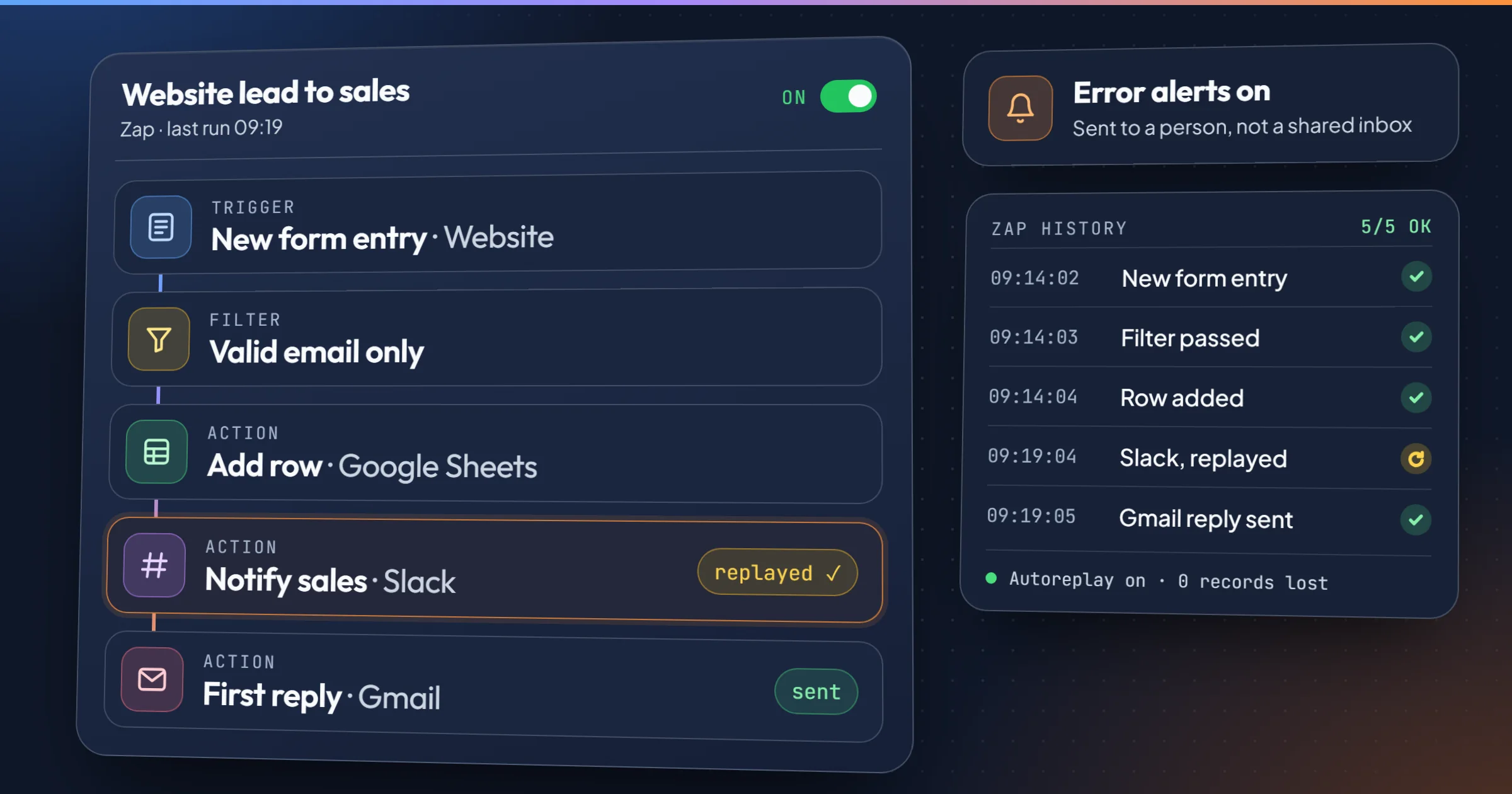
A typical example: someone fills in the contact form on your website. The Zap adds a row in Google Sheets, posts the lead in your sales channel on Slack and sends a first reply from Gmail, before anyone on your team has opened their inbox.
Our approach is simple: we map your process first, then automate it. We don't start with Zapier's features and force your work into them. We start with your workflow and use Zapier only where it makes sense. If a task is better handled by a native integration or a simple script, we'll tell you. Zapier is a tool, not a religion.
We also build on Make and n8n, and we pick the platform per workflow, after mapping it, never out of habit.
What you gain when your Zaps actually work
A working Zapier workflow automation tool changes how your day feels. Here are the benefits our clients notice first:
- Time back in your week: The average Zap saves a few minutes per occurrence. Run it 50 times a day and you've reclaimed hours. We focus on high-frequency, low-complexity tasks that compound.
- Fewer errors: Manual data entry has an error rate. Automation has none, as long as the mapping is correct. We test every step before handing over.
- No more forgotten follow-ups: Zaps can trigger reminders, create tasks, or send emails based on conditions you define. Your team stops relying on memory.
- Cleaner data: When data moves automatically between apps, it stays consistent. No more "which spreadsheet is the latest?"
- Scalability without hiring: As your volume grows, the Zap handles it. You don't need to add headcount for routine work.
These benefits only materialize if the automation is built correctly. A broken Zap is worse than no Zap because it creates false confidence. We test, monitor, and document every workflow we deliver.
On every Zap we hand over, that means four safeguards:
- Error alerts that reach a person: Zapier's error notifications go to someone who will act on them, not to a shared inbox nobody reads.
- Automatic retries: with Autoreplay switched on, a step that failed because an app was briefly down is replayed instead of losing the record.
- Filters before every write: a filter step stops incomplete or duplicate records before they reach your CRM or your spreadsheet.
- A guard against silent failures: the worst breakdown is the Zap that runs "successfully" while writing nothing. We add a daily count or an alert when nothing comes through.
How we build your Zapier workflow automation tool
We follow a three-step process that keeps you in control and avoids surprises.
- Map the workflow: We talk through the task you want to automate. What triggers it? What apps are involved? What should happen at each step? We write this down in plain language before touching Zapier.
- Build and test: We create the Zap, connect your accounts, and run test data through it. We fix edge cases, error handling, and mapping issues. You see it working before we call it done.
- Hand over with documentation: You get a simple guide explaining what the Zap does, how to pause it, and how to edit it. We also offer ongoing support if you need changes later.
This process takes days, not months, for most workflows. Complex multi-step automations may take longer, but we'll give you a realistic timeline upfront.
What you get when we're done
You receive a working Zapier workflow automation tool, not just a promise. Here's what's included:
- A configured Zap (or set of Zaps) that runs automatically.
- Documentation in plain English, not developer jargon.
- A short training session for your team.
- 30 days of post-launch support to fix any issues.
We don't lock you into a long-term contract. If you want us to maintain the automation, we offer a monthly copiloting service. If you prefer to manage it yourself, the documentation and training make that possible.
Our pricing is transparent. A simple automation project starts at €1,500 excl. VAT. More complex workflows with multiple steps or custom logic are quoted after a diagnosis, from €1,000 excl. VAT. We'll give you a fixed quote before starting, so there are no surprises.
Why you can trust us with your automations
We've been building automations for SMEs since 2025. Our co-founder, Rémy Ginoux, spent 25 years in industrial operations at companies like Volvo Group and Airbus Atlantic, where he saw firsthand how much time gets wasted on manual tasks. Our co-founder and AI engineer, Romain Ben, brings the technical depth to handle complex integrations.
We don't claim to be the cheapest. We claim to build automations that work and keep working. One of our clients, Paul Bergé Lemonnier, an influence agent, came to us with a prospecting routine that ate his mornings: reading the trade press to spot the brands worth pitching. We built an automated monitoring workflow that reads 25 industry feeds every weekday, has an AI rank each signal by priority, writes one line per brand in a shared Google Sheet and emails him a digest. On one of its first full runs, it read 336 articles and kept the 14 worth a call, in two minutes. It has been running in production since July 2026, for a few euros of AI per month, and it flags a broken feed in the very next report.
That one runs on n8n, not Zapier: the AI step needed batching and fine control over errors. It is exactly the kind of call we make before building.
We also admit our limits. Zapier is great for connecting cloud apps, but it's not the right tool for everything. If your process involves heavy data transformation or on-premise systems, we'll recommend a different approach, like a custom n8n workflow or a direct API integration. We'd rather lose a project than build something that fails. And if what you need is a new website or better search rankings rather than automation, a full-service agency like Minneapolismade is a better fit than us.
Ready to automate your repetitive work?
If you have a task that eats hours every week, let's talk. We'll assess whether Zapier is the right tool and give you a clear plan. No pressure, no jargon.
Book a free 20-minute audit call and tell us what you want to automate. We'll tell you if it's feasible and what it would take.
Frequently asked questions
How much does a Zapier workflow automation tool cost?
Our projects start at €1,500 excl. VAT for a simple automation. More complex workflows with multiple steps or custom logic are quoted after a diagnosis, from €1,000 excl. VAT. We provide a fixed quote after understanding your requirements.
How long does it take to set up a Zapier workflow?
Most simple automations are live within 1 to 2 weeks. Complex workflows may take 3 to 5 weeks. We'll give you a timeline during the initial consultation.
What if Zapier isn't the right tool for my process?
We'll tell you. Zapier works well for connecting cloud apps with straightforward logic. If your process requires heavy data transformation, on-premise systems, or complex branching, we may recommend n8n, Make, or a custom integration. Our goal is the right tool for the job.
Do you provide ongoing support after the automation is live?
Yes. Every project includes 30 days of post-launch support. After that, you can choose our monthly copiloting service (from €100 excl. VAT per month) for continuous monitoring and improvements, or manage it yourself with our documentation.
Can you integrate Zapier with my existing tools?
Zapier connects with over 9,000 apps. If your tools are on that list, we can integrate them. If not, we'll explore workarounds or alternative automation platforms. Most modern tools also expose a webhook or an API, which Zapier can call directly.