
You need to automate a process, but you don't have a developer on hand. Low code workflow automation tools promise to solve that. The problem: there are dozens of them, and they all look the same on a landing page.
This article cuts through the noise. We'll compare the tools that actually matter for small and medium businesses, based on real-world use, not marketing copy. Real-world use here means ours: we build and maintain these workflows for SME clients, and our own production workflows run every weekday.
Verdict: The Shortlist Up Front
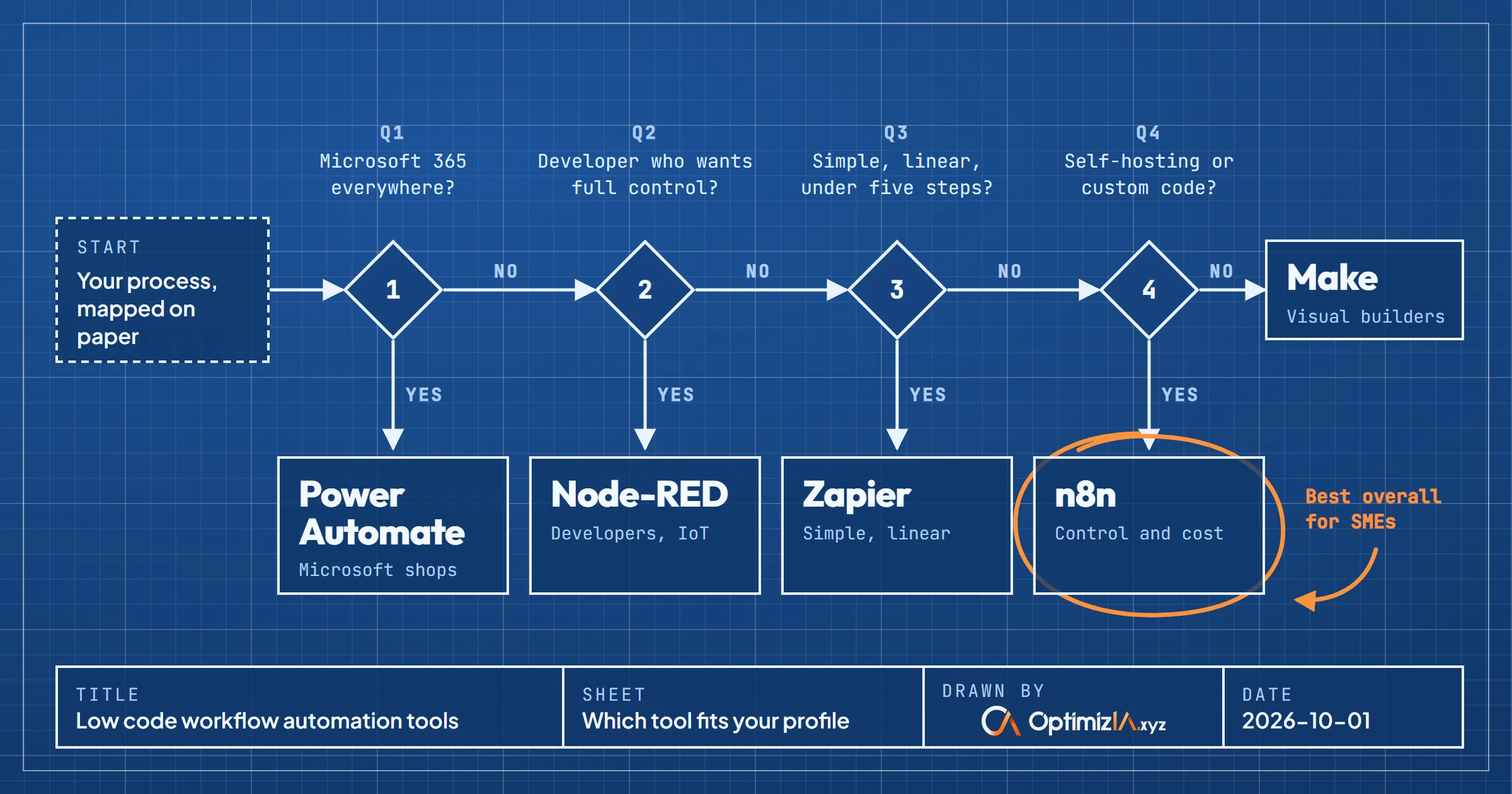
If you want a tool that balances power and ease of use, start with n8n or Make. Both handle complex workflows, can be used for free (n8n when you self-host it), and don't lock you into a rigid pricing model. If you need something simpler and you're already in the Microsoft ecosystem, Power Automate is a solid choice. If you're a developer who wants full control, Node-RED is the most flexible, but it requires more setup.
Here's the short version:
- Best overall for SMEs: n8n (self-hosted or cloud, fair-code licensed)
- Best for visual builders: Make (formerly Integromat)
- Best for Microsoft shops: Power Automate
- Best for developers: Node-RED
- Best for simple, linear automations: Zapier (but watch the pricing)
We'll go into detail below, but this is the verdict. Don't waste time evaluating 20 tools; these five cover most use cases.
Selection Criteria: What Actually Matters
When comparing low code workflow automation tools, most review sites list features. Features are easy to copy. What matters more:
- Learning curve: How fast can a non-developer build a working automation?
- Flexibility: Can the tool handle branching logic, error handling, and custom code when needed?
- Pricing model: Does the cost scale with your usage, or does it jump suddenly?
- Integration depth: Does it connect to the specific apps you use, with the right triggers and actions?
- Hosting options: Can you self-host for data privacy or cost control?
- Community and support: Is there an active community for troubleshooting?
We weigh these criteria differently depending on your team. A solo founder with no technical background needs a different tool than a small IT team managing multiple departments.
Comparison Table
Here's a side-by-side look at the main options:
| Tool | Ease of Use | Flexibility | Pricing Model | Self-Hosting | Best For |
|---|---|---|---|---|---|
| n8n | Moderate | High | Fair-code, free self-hosted, paid cloud | Yes | SMEs wanting control and cost efficiency |
| Make | High | High | Subscription, based on credits | No | Visual thinkers, complex scenarios |
| Power Automate | High | Moderate | Per user or per flow, Microsoft 365 bundles | No | Microsoft-centric businesses |
| Node-RED | Low | Very High | Free, open source | Yes | Developers, IoT, custom integrations |
| Zapier | Very High | Moderate | Subscription, based on tasks | No | Simple, linear automations |
This table is a starting point. The details below explain why each tool lands where it does.
Which Tool Fits Your Profile
You're a non-technical founder or marketer
Pick Zapier or Make. Zapier is the easiest to learn: you pick a trigger, pick an action, and you're done. It handles thousands of apps. The downside is cost: once you run many tasks, the price climbs. Make is slightly more complex but gives you a visual canvas to design multi-step workflows. For most marketing or sales automations, either works. If Zapier is your pick, here is how we build Zaps that keep running.
You're a small IT team or a technical founder
Pick n8n. It's fair-code licensed, so you can self-host it for free on your own server. That means no per-task fees and full control over your data. The learning curve is steeper than Zapier, but the community is active and the documentation is solid. n8n also lets you write custom JavaScript or Python inside a workflow if you need to. Our open source comparison covers what self-hosting it involves day to day.
You're already deep in Microsoft 365
Pick Power Automate. It integrates natively with Outlook, SharePoint, Teams, and Excel. If your team lives in those apps, Power Automate is the path of least resistance. The per-user pricing can be reasonable if you already have Microsoft 365 licenses. Just be aware that complex flows can get clunky, and debugging is not always straightforward.
You're a developer who wants full control
Pick Node-RED. It's open source, runs on Node.js, and has a huge library of nodes for everything from HTTP requests to MQTT. It's not as polished as the commercial tools, but you can build anything. If you're comfortable with JSON and basic programming, Node-RED is a powerful choice.
Pricing Ranges: What to Expect
We won't list exact prices here because they change often and depend on your usage. But here's how the pricing models work:
- Zapier: Free tier for basic use, then paid plans based on the number of tasks (each completed action counts; triggers don't). Costs can rise quickly if you have high-volume automations.
- Make: Similar to Zapier, but pricing is based on credits (one credit per module action for standard apps). The free tier is generous, and paid plans scale more gradually.
- n8n: Free if you self-host. Cloud version has a free trial and paid plans based on workflow executions: one execution is one full run, however many steps it has. Self-hosting is the most cost-effective for high volume.
- Power Automate: Included with many Microsoft 365 plans, but premium connectors and additional flows cost extra. Per-user pricing can be confusing.
- Node-RED: Free, open source. You pay only for the server you run it on.
For a small business, the total cost depends on how many automations you run and how many people need access. A simple lead notification might cost nothing on any tool. A complex multi-step workflow with thousands of runs per month could cost hundreds per month on Zapier but nearly nothing on self-hosted n8n.
Our own reference point: the lead monitoring agent we run for a client reads around 40 articles every weekday. On self-hosted n8n, each daily run counts as one execution, and the monthly bill is the server plus a few euros of AI. Built on Zapier, every action on every article would count as a task: well over a thousand a month, for a single workflow.
Common Objections and Real Answers
"I tried a tool before and it didn't work for my process."
That's usually because the tool was a poor fit, not because automation is impossible. For example, if you tried Zapier for a workflow with many conditional branches, you likely hit its limits. n8n or Make handle branching much better. Before choosing, map your process on paper. If it has more than five steps with conditions, skip Zapier.
"I'm worried about data privacy."
Self-host n8n or Node-RED. Your data stays on your server. If you must use a cloud tool, check where your data is processed and whether the tool is GDPR compliant. For sensitive customer data, self-hosting is the safer route. That is how we run our own n8n: in Docker, on a server we manage.
"I don't have time to learn a new tool."
Start with Zapier or Make. You can build a simple automation in under an hour. If you need something more complex later, you can migrate. The time you spend learning pays back quickly once repetitive tasks are off your plate.
In the AI adoption workshop we ran for freelancers and solopreneurs in March 2026, process automation with n8n, Make or Zapier was level 3 on a six-level map of AI use, and the goal set for the room was two hours freed every day.
"What if the tool breaks or the company goes out of business?"
Choose a tool with an active community and open standards. Node-RED is open source and n8n publishes its code under a fair-code license, so even if the company behind them changes course, the software remains available. Zapier and Make are established companies with large user bases. Power Automate is backed by Microsoft, so it's not going anywhere.
A Realistic Example: Automating Lead Follow-Up
Let's say you want to automatically follow up with new leads from your website form. Here's how you'd approach it with different tools:
- Zapier: Trigger on new form submission, create a row in Google Sheets, send a Slack notification. Simple, done in 10 minutes.
- Make: Same trigger, but you can add a delay, check if the lead is in your CRM, and send a personalized email based on the lead's industry. More steps, but still visual.
- n8n: Same as Make, but you can also query an external API for lead scoring, branch based on the score, and update your CRM. You can self-host to avoid per-task fees.
- Power Automate: If your form is Microsoft Forms, the trigger is native. You can post to Teams, update an Excel file, and send an email via Outlook. Tight integration, but less flexible outside Microsoft.
- Node-RED: You'd build the entire flow with nodes, including the webhook endpoint. More work, but you can handle any custom logic.
This example shows why the "best" tool depends on your specific needs. For a simple notification, Zapier is fine. For a multi-step lead scoring and routing process, n8n or Make is better.
Our closest real case sits one step before the form. For Paul Bergé Lemonnier, an influence agent, we built a lead monitoring agent that reads 25 industry feeds every weekday, has an AI rank each signal into three tiers and emails him a digest. On one of its first full runs, it read 336 articles and kept the 14 worth a call, in two minutes. It runs on n8n, not Zapier or Make: the AI step sends articles in batches of 40, and the workflow needed fine control over what happens when one of them fails.
What Most Comparisons Miss
Most articles compare features and pricing. They miss two things:
- The cost of switching. If you build 50 automations in Zapier and then realize you need n8n's flexibility, migrating is painful. Think long-term before you invest heavily in one platform.
- The importance of error handling. Real-world automations fail: an API is down, a field is missing, a rate limit is hit. Tools like n8n and Make have robust error handling and retry logic. Zapier has added error handler paths and automatic replay on its paid plans, but nothing like Make's rollback and commit. If your workflow is mission-critical, this matters more than the number of integrations.
On the monitoring agent above, error handling is most of the engineering. The call to the AI model retries three times, five seconds apart, so a temporary overload no longer fails the run. A separate error workflow emails a readable diagnosis. And the digest goes out every day, even with zero signals, so that "nothing to report" can never be mistaken for "broken".
Also, consider the community. n8n has a very active forum and Discord. Make has a large user base and many templates. Zapier's support is good but the community is less technical. Node-RED's community is developer-centric. Power Automate's community is enterprise-focused.
How We Pick for Our Clients
The rule in this article is the one we apply on client projects: map the process first, choose the tool second. In practice, it comes down to three questions:
- Who maintains it after us? If the client's team wants to edit it alone, a simple linear flow goes on Zapier or Make, where they can read it.
- Is there an AI step or real volume? Batches, retries and thousands of items a month go on n8n, where a run is one execution whatever it does inside.
- Where must the data live? When it should stay on a server we control, it is self-hosted n8n. Both of our production case studies run there.
A simple automation project starts at €1,500 excl. VAT, and our copiloting, which keeps an eye on workflows once they run, from €100 excl. VAT per month.
Further Reading
If you're evaluating automation for your business, these resources on our site can help:
- Automated reporting shows how to set up automated reports that save hours each week.
- Lead monitoring explains how to track leads automatically and respond faster.
- AI training covers how to train your team on AI and automation tools.
These case studies give you concrete examples of what's possible with low code automation.
Frequently asked questions
What is the easiest low code workflow automation tool for beginners?
Zapier is the easiest. You can create a simple automation in minutes without any technical knowledge. Make is also beginner-friendly but has a slightly steeper learning curve due to its visual canvas.
Can I use low code workflow automation tools for free?
Yes, most tools have a free tier. n8n is free if you self-host. Zapier and Make have free plans with limited tasks. Node-RED is completely free and open source. Power Automate is included with many Microsoft 365 plans.
Which tool is best for complex workflows with many conditions?
n8n or Make. Both handle branching, loops, and error handling well. n8n also allows custom code, making it suitable for very complex logic. Zapier is not ideal for complex workflows.
Is self-hosting worth the effort?
If you have high-volume automations or strict data privacy requirements, yes. Self-hosting n8n or Node-RED eliminates per-task fees and keeps your data on your own server. The effort is moderate: you need a server and basic DevOps knowledge.
How do I choose between n8n and Make?
If you prefer a visual, no-code interface and don't want to manage servers, choose Make. If you want the option to self-host, write custom code, and avoid paying for every step, choose n8n. Both are powerful; the choice depends on your technical comfort and cost sensitivity.