
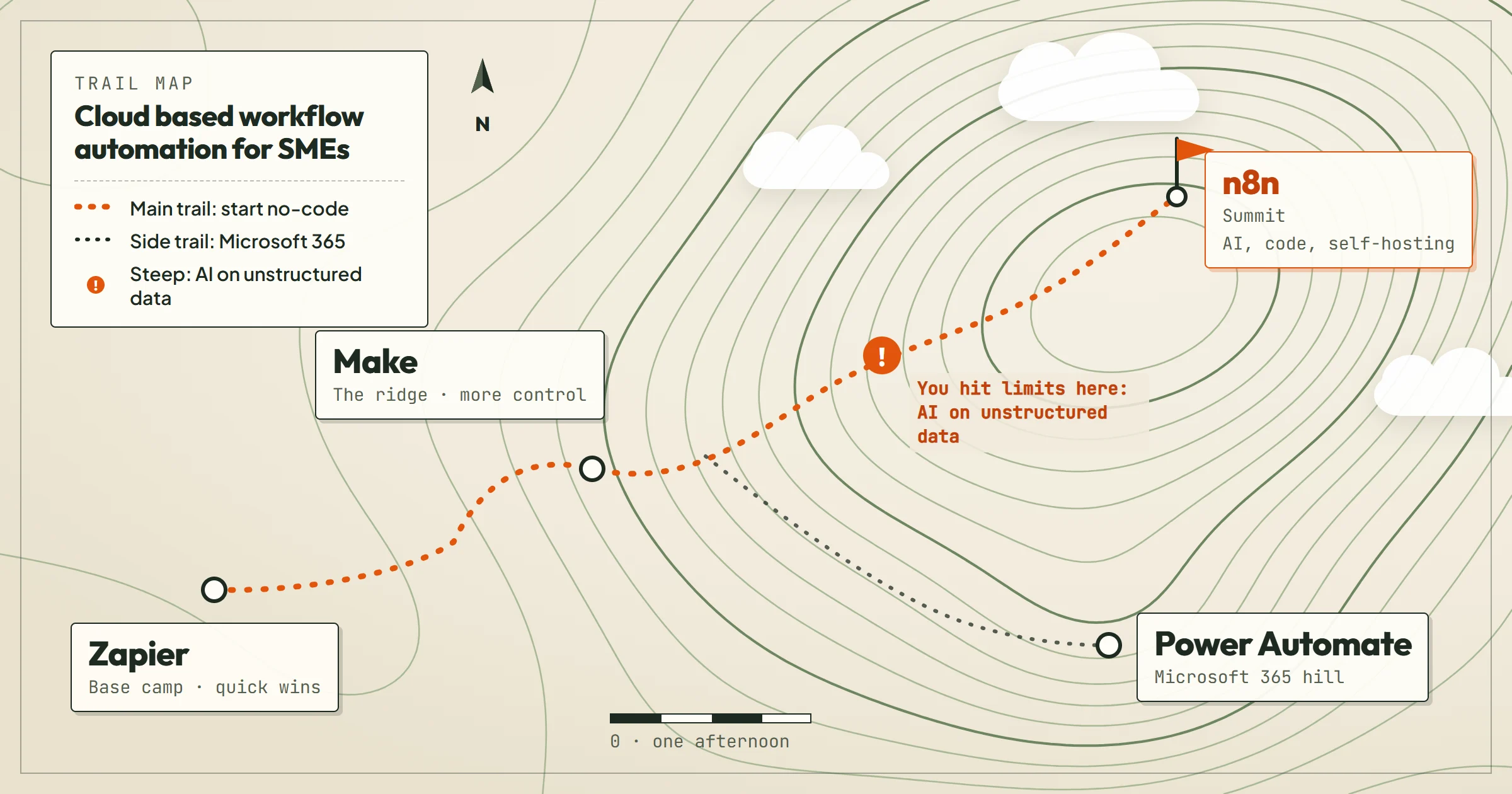
If you run a small or medium business, you have probably felt the drag of repetitive tasks: copying data between apps, chasing approvals, sending the same follow-up email. Cloud based workflow automation removes that drag. It connects the software you already use and makes it work together, so a new lead in your CRM can trigger a Slack message, a task in your project tool, and an email to the prospect, all without you touching anything.
But the market is crowded. Zapier, Make, n8n, Power Automate, and a dozen others all promise to save you time. Which one fits an SME? This article compares the main options, with a clear verdict up front, selection criteria, a comparison table, and guidance on pricing. We will also cover when a custom setup with an agency like OptimizIA.xyz makes sense.
Verdict: Start with no-code, graduate to n8n when you hit limits
For most SMEs, the best first step is a no-code automation tool. Zapier is the easiest to learn and has the largest app library. Make is more visual and cheaper for high-volume automations. If you need AI to handle unstructured data, like reading emails or classifying support tickets, you will likely outgrow these tools quickly: not for lack of AI features, which both now package, but for control over the model, the volume and where the data goes. That is when a custom n8n workflow, possibly built with help from an agency, becomes the better choice.
Here is the short version:
- Zapier: best for quick wins and non-technical teams. Simple, reliable, but expensive as you scale.
- Make: best for visual thinkers who want more control and lower cost per action. Steeper learning curve than Zapier.
- n8n: best for technical teams or when you need AI, custom code, and self-hosting. Free for self-hosted, but requires maintenance.
- Power Automate: best if you are deep in Microsoft 365. Clunky outside that ecosystem.
If you are unsure, start with Zapier or Make for one or two automations. Measure the time saved. Then decide if you need to invest in n8n. Our Zapier guide shows how we build that first automation so it keeps running.
Selection criteria: what actually matters for an SME
When comparing cloud based workflow automation tools, ignore the marketing fluff. Focus on these five criteria:
- Ease of setup: Can a non-developer build a workflow in an afternoon? If not, you will pay in time or consulting fees.
- App integrations: Does it connect to the tools you already use? Check for native integrations, not just webhooks.
- AI capabilities: Can it handle unstructured data like emails, PDFs, or images? No-code tools now package their own AI steps; n8n lets you plug in any AI model, including one running on your own server.
- Cost at scale: Many tools are cheap for 100 operations per month but expensive at 10,000. Calculate your expected volume.
- Flexibility and control: Can you add custom code, self-host, or export your workflows? This matters for compliance and vendor lock-in, which our open source comparison covers in detail.
For an SME, ease of setup and app integrations usually outweigh advanced features. You want a tool that your team will actually use, not one that sits idle because it is too complex.
Comparison table: Zapier vs Make vs n8n vs Power Automate
| Tool | Ease of setup | AI capabilities | Pricing model | Best for |
|---|---|---|---|---|
| Zapier | Very easy | Packaged (AI steps, agents, Copilot) | Per task, gets pricey | Non-technical teams, quick wins |
| Make | Moderate | Built-in AI agents, any model over HTTP | Per credit, cheaper than Zapier | Visual thinkers, complex multi-step flows |
| n8n | Technical | Excellent (custom AI nodes, any model) | Free self-hosted, paid cloud | Technical teams, AI-heavy workflows |
| Power Automate | Moderate | Good within Microsoft ecosystem | Per user or per flow, included in some M365 plans | Microsoft-centric businesses |
This table is a snapshot. Your specific needs may shift the ranking. For example, if you need to process invoices with AI using a model you choose, n8n is the only one of the four you can self-host for free and connect to any model, including a local one, so invoices never leave your servers. Make can also call your own model over HTTP, even on its free plan, within its credit limits. For a wider list that includes Node-RED, see our low code comparison.
Who should choose which option
Choose Zapier if: you have no technical staff, you need a quick automation between two popular apps, and you are willing to pay for simplicity. A marketing manager who wants to add new email subscribers to a Google Sheet can set this up in minutes.
Choose Make if: you are comfortable with a visual builder, you want to save money on high-volume automations, and you need more complex branching logic. An operations manager who wants to route support tickets based on keywords will find Make more flexible than Zapier.
Choose n8n if: you have a developer on staff or you work with an agency, you need AI to handle unstructured data, or you want to self-host for data privacy. A logistics company that wants to parse emails and extract shipment details would use n8n with a custom AI model.
Choose Power Automate if: your company runs on Microsoft 365 and you want to automate approvals, document generation, or SharePoint workflows. It is less friendly for non-Microsoft apps.
If you are an SME without a technical team, the pragmatic path is to start with Zapier or Make, then bring in an agency like OptimizIA.xyz when you hit a wall. OptimizIA.xyz specializes in n8n and AI workflows for SMEs, and they offer a free 20-minute audit call to assess your needs.
A Real Case: AI on Unstructured Data, Measured
What does "AI on unstructured data" look like once it runs every day? Our reference is the lead monitoring agent we built on n8n for Paul Bergé Lemonnier, an influence agent. Every weekday, it reads the full text of what 25 trade press feeds published, has Claude Sonnet 5 keep what is actionable and rank each signal into three tiers with a one-sentence justification, then emails him a digest.
- Outcome: on one of its first full runs, it read 336 articles and kept the 14 worth a call, in two minutes.
- Scale limit: a catch-up run of 195 articles came to 158,000 tokens, 80% of the model's context window. The workflow now sends articles in batches of 40.
- Cost: a few euros of AI per month. A smaller model would have cost about 25 cents, but the real risk was the client seeing off-topic results and no longer opening the digest, so we paid for judgment.
Each of these choices, the model, the batch size and the cost trade-off, is one a packaged AI step does not let you make. The same stack runs our automated reporting pipeline, where several AI agents score each asset on five dimensions every week and publish an HTML and a PDF report.
Price ranges: what to expect
Pricing for cloud based workflow automation varies widely. No-code tools typically charge per task or credit, with monthly plans that scale with volume. Zapier's free plan is limited, and paid plans start low but can climb quickly if you run many automations. Make is generally cheaper per operation but has a steeper learning curve. n8n is free if you self-host, but you pay for server costs and maintenance time. Power Automate is often included in Microsoft 365 business plans, but premium connectors cost extra. Its AI Builder credits are also changing: new Premium licenses no longer include them from November 1, 2026.
For custom builds with an agency, OptimizIA.xyz's pricing is transparent: a diagnostic starts at €1,000 excl. VAT, a proof of concept or MVP starts at €1,500 excl. VAT, and ongoing copiloting starts at €100 excl. VAT per month. A proof of concept reaches a working MVP in 13 days on average, and the final quote depends on how far the AI-enhanced workflow goes beyond simple app connections.
When budgeting, consider not just the tool cost but the time to build and maintain automations. A tool that saves you 10 hours a month but takes 5 hours to maintain is less valuable than one that saves 8 hours with zero maintenance.
Common questions during the buying process
Can I start with a free tool and switch later?
Yes. Zapier and Make have free tiers that let you test basic automations. n8n is free if you self-host. The risk is building complex workflows in a tool that becomes expensive or limiting, then having to rebuild them elsewhere. Start small, document your processes, and be ready to migrate if needed.
Do I need a developer to set up cloud based workflow automation?
For simple automations, no. Zapier and Make are designed for non-technical users. For AI-heavy or custom workflows, yes, you will likely need a developer or an agency. OptimizIA.xyz's team brings 25 years of industrial field experience, through co-founder Rémy Ginoux, and builds n8n workflows that handle unstructured data.
What about data privacy and security?
Cloud tools store your workflow data on their servers. Zapier is hosted on AWS in the United States; Make runs on AWS in the EU or North America. If you handle sensitive data, you may prefer self-hosting n8n on your own infrastructure. This gives you full control but requires technical expertise. OptimizIA.xyz can advise on the best approach for your compliance needs.
Frequently asked questions
What is cloud based workflow automation?
Cloud based workflow automation uses online tools to connect different apps and services, so actions in one app trigger actions in another without manual work. Examples include automatically saving email attachments to cloud storage or syncing new leads from a form to a CRM.
Which tool is best for a small business with no technical staff?
Zapier is the easiest to learn and has the largest library of pre-built integrations. It is a good starting point for non-technical teams. Make is also user-friendly but offers more flexibility for complex flows.
How much does cloud based workflow automation cost?
Costs vary. No-code tools like Zapier and Make charge monthly fees based on usage, typically starting under $30 per month for basic plans. Custom builds with an agency like OptimizIA.xyz start at €1,000 excl. VAT for a diagnostic and €1,500 excl. VAT for a proof of concept. Self-hosted n8n is free but requires server costs and maintenance.
Can AI be integrated into cloud workflows?
Yes, but the level of AI integration differs. Zapier and Make now package their own AI steps and agents. n8n allows you to connect to any AI model, including open-source ones run on your own server, for tasks like text classification, data extraction, and image recognition. For SMEs that need AI to handle unstructured data, n8n is often the best choice.
Should I hire an agency or do it myself?
If you have simple needs and some time to learn, start with a no-code tool yourself. If you need AI, custom code, or complex integrations, an agency can save you months of trial and error. OptimizIA.xyz offers a free 20-minute audit call to help you decide.