
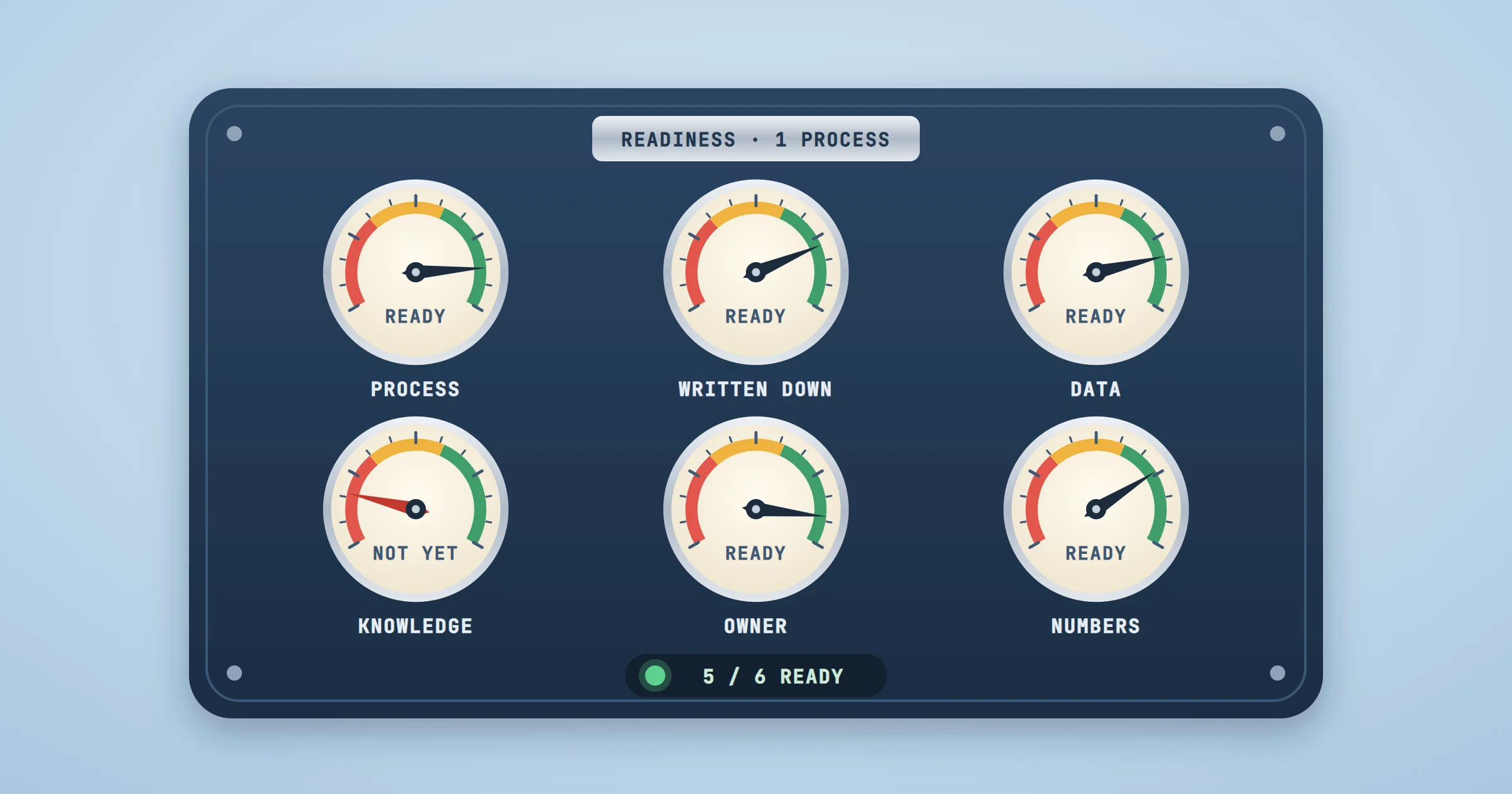
Most readiness checklists online are written for companies with an IT department, a data team and a transformation budget. They score the whole organization on maturity levels. An SME of thirty people does not need a maturity score. It needs to know whether the invoices, the quotes or the customer emails that eat a day a week can be automated this quarter. This checklist is built for that question, and it is the one we start from at OptimizIA.xyz.
What an AI Readiness Assessment Actually Measures
A useful assessment measures one process, not the company. A business can be ready to automate its supplier invoices and not ready at all for its customer support, because the first runs on clean PDFs and the second on knowledge that lives in two people's heads.
It also measures readiness for a specific kind of automation. A workflow that moves data between tools with n8n or Make asks less of you than an assistant that answers questions from your documents. If you are still deciding which kind you need, our framework on intelligent automation separates the three layers.
The Six Questions
1. Is there one process that costs time every week?
Name it, and put a number on it. "Admin takes too long" is not a process. "Two people spend six hours a week copying order details from emails into the ERP" is. If you cannot name one process worth at least a few hours a week, AI is not your first problem.
2. Is the process written down, including the exceptions?
Who does what, in which tool, and what happens when something is missing? A person can improvise; a workflow cannot. If the process only exists in someone's habits, writing it down is the first deliverable, and it often removes a third of the work before any automation.
3. Can a tool reach the data?
Check where the data lives: a SaaS tool with an API, an export you can schedule, a shared spreadsheet, or an old desktop application with no way in. An API or an export makes automation straightforward. A screen-only application needs a robot that reads the screen, which is slower and more fragile, so it is the last resort.
4. Is the knowledge in documents, or in someone's head?
AI can answer from your procedures, price lists and past emails, but only if they exist and are up to date. If two versions of the same procedure contradict each other, an assistant will quote both. When the know-how sits with one senior employee, capturing it comes before automating it.
5. Does one person own the result?
Every automation that lasts has an owner: someone who decides what "correct" means, checks the output in the first weeks and flags when the process changes. Without that person, the workflow drifts and nobody notices until a customer does.
6. Do you know what success looks like, in numbers?
Hours saved per week, error rate, response time, cost per document. Write the target down before building anything. It becomes the acceptance criterion of the proof of concept, and it tells you when to stop.
Score Yourself
Take one process and answer the six questions honestly.
| Question | Ready | Not yet | What to do first |
|---|---|---|---|
| A process that costs time | Named, with hours per week | "Everything takes too long" | Pick the process that hurts most and time it for a week |
| Written down | Steps and exceptions on paper | Only in someone's habits | Write it with the person who does it |
| Data a tool can reach | API, export or shared file | Screen-only application | Check for an export or an API before a robot |
| Knowledge in documents | Current procedures and references | In one person's head | Capture the know-how, then automate |
| One owner | A named person with time | "The team" | Name an owner before any build |
| Success in numbers | A target per week or per document | "It should be faster" | Measure today's baseline |
- Five or six "ready": you do not need a diagnostic. Go straight to a proof of concept on that process.
- Three or four: a short diagnostic will tell you which gaps to close and whether the gain is worth it.
- Two or fewer: start with the process itself, and with your team: our AI training workshops exist for teams who need to understand the tools before choosing a use case.
What We See in Practice
Our lead monitoring project ticked all six boxes. One person read a sector's trade press by hand every morning to spot brands worth contacting: a named process, written down in a single sentence, public data, knowledge that fit in a scoring rule, one owner, and a clear measure of success. Today an n8n pipeline does the reading every weekday morning, scores what it finds and delivers a sorted table; the owner decides whom to contact.
Our own weekly newsletter went the same way. The process was clear, the sources were public, and the success criterion was strict: no invented link, ever. That criterion shaped the build: the model only chooses articles, and the code places every link. Our article on workflow marketing automation describes the chain.
The projects that stall are the ones that fail question 5 or 6: nobody owns the result, or nobody can say what "good" looks like. No tool fixes that.
What a Diagnostic Adds to a Self-Assessment
A self-assessment tells you whether one process is ready. A diagnostic tells you which processes are worth it, and how much they are worth. Our AI & Knowledge Diagnostic runs for one to three weeks and covers:
- Scoping workshops with leaders and frontline teams, to match the strategy with day-to-day pain points.
- A map of how data, documents and decisions actually flow, and where the friction and lost information sit.
- A quantified estimate of the gains per use case, in time, cost and quality, with the assumptions written down.
- A prioritized roadmap that separates quick wins from deeper projects.
It starts from €1,000 excl. VAT, with a fixed quote after the first call, and the deliverable stands on its own: you can implement it with us, with someone else or in-house. If you already know which process you want to automate, skip it: a PoC and MVP starts from €1,500 excl. VAT, and a validated proof of concept becomes a working MVP in 13 days on average.
Common Mistakes
- Scoring the whole company. A company-wide maturity score says nothing about which process to automate next.
- Buying a tool before answering questions 2 and 3. The tool will not document your process or open your data.
- Waiting for perfect data. You need to know what your data is and where it lives, not to clean all of it first.
- Leaving ownership to "the team". A workflow without an owner drifts.
- Skipping the baseline. Without today's numbers, you cannot prove the gain, and the next project gets harder to fund.
Take the Next Step
Run the six questions on the process that annoys you most this week. If the numbers look promising, check them with our automation ROI calculator, then book a call: we will tell you whether you need a diagnostic, a proof of concept, or nothing at all yet. If you are comparing providers, our guide to choosing an AI automation consultant lists what to ask for.
Frequently asked questions
How long does an AI readiness assessment take?
The six-question self-assessment takes an hour per process. A full diagnostic, with workshops, interviews and a costed roadmap, takes one to three weeks at OptimizIA.xyz.
Do I need clean data before starting with AI?
No. You need to know where your data lives, whether a tool can reach it, and how reliable it is. Many first projects start with imperfect data and a human check on the uncertain cases.
Can I do an AI readiness assessment myself?
Yes, for one process: the six questions above are enough to decide whether to test it. A diagnostic becomes useful when you have several candidate processes and need to know which ones pay off first.
How much does an AI readiness assessment cost?
The self-assessment is free. At OptimizIA.xyz, the AI & Knowledge Diagnostic starts from €1,000 excl. VAT, with a fixed quote after the first call, and you are not committed to any next step.