
This framework is the one we apply at OptimizIA.xyz, a network of AI, automation and Knowledge Management experts based in Béziers. The examples below come from systems we built and still run in production.
What Intelligent Automation Really Means for an SME
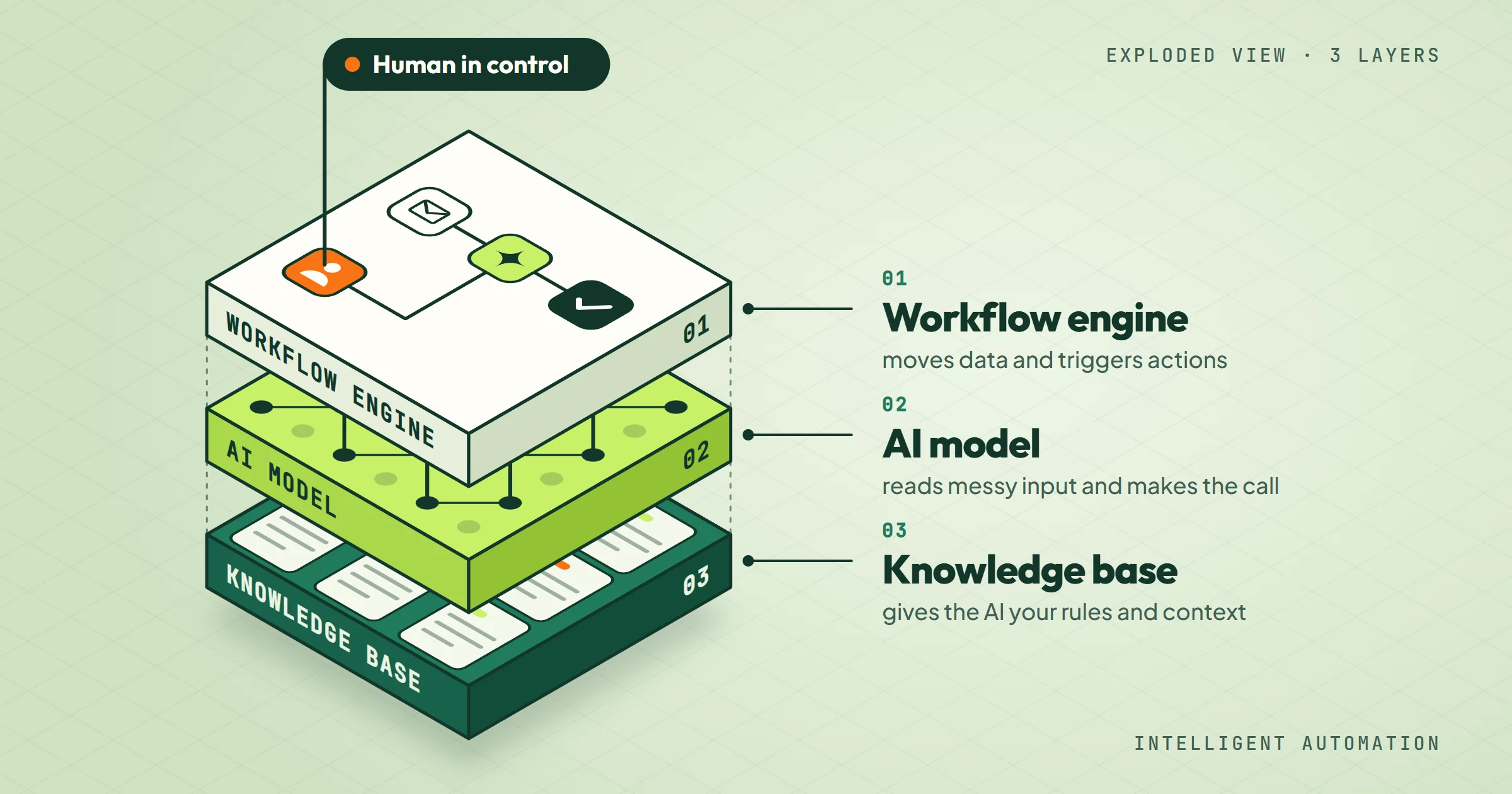
Intelligent automation is not a single tool. It is a combination of three layers:
- A workflow engine that moves data and triggers actions.
- An AI model that interprets unstructured input or makes a prediction.
- A knowledge base that gives the AI the context it needs about your business.
When these three layers work together, you can automate tasks like reading an email, extracting the relevant details, and routing it to the right person, or monitoring a set of sources and flagging only what matters.
For an SME, the goal is rarely to build a fully autonomous system. The goal is to remove the repetitive middle part of a process while keeping a human in control of exceptions and final decisions. That distinction matters because it changes what you buy and how you measure success.
Why the term gets confusing
Vendors use "intelligent automation" to describe everything from simple rule-based bots to large language models that write code. The practical difference for you is whether the system can handle variation. A rule-based automation works when the input is predictable: if the invoice number is missing, send an email. An intelligent automation works when the input varies: read the email, understand that the customer is asking about a late delivery, and create a support ticket with the right priority.
Four related terms come up in the same sales pitches. Here is what each one covers:
- RPA (robotic process automation): software robots that replay clicks and keystrokes on fixed rules. There is no judgment involved.
- Intelligent document processing: AI that reads invoices, contracts or forms and returns structured data.
- AI agents: a language model that plans several steps and calls your tools on its own, within limits you set.
- Hyperautomation: a vendor word for combining all of the above across a whole company. It is rarely where an SME should start.
How Intelligent Automation Works: A Method That Fits SMEs
The method we use with SMEs follows a simple sequence: find a process that is high friction and low variation, build a proof of concept in two to five weeks, then decide whether to scale or stop. This is not a theoretical framework. It is the same approach described in how an engagement runs with us, and it works because it forces you to prove value before spending more.
Step 1: Pick the right process
The best candidate for a first intelligent automation project has three characteristics:
- It happens often enough that the time savings add up.
- It requires some judgment, so a simple rule-based bot would fail.
- It has a clear owner who can explain the current manual steps and test the automated version.
A process that fails any of these tests will create more work than it saves.
Step 2: Map the decision points
Before you touch any tool, write down every decision a human makes in the process. For example, in lead follow-up, a human might decide: is this lead worth calling today? The answer depends on the lead's industry, the size of the company, and the content of their message. That decision is where AI adds value. The workflow around it, moving the lead to a CRM or sending a notification, is standard automation.
Step 3: Build a proof of concept
A proof of concept should take two to five weeks and cost from €1,500 excl. VAT if you work with a specialist. The goal is to automate one narrow slice of the process end to end, with real data, and measure the result. You are not building the final system. You are testing whether the AI can make the decision well enough to save time without creating errors that cost more than the time saved.
On our own projects, going from proof of concept to a working MVP on a controlled scope takes 13 days on average.
Step 4: Decide based on evidence
After the proof of concept, you have three options: scale it, adjust it, or stop.
- Scale: Scaling means adding more data sources, more decision rules, or more steps to the workflow.
- Adjust: Adjusting means the AI works but the workflow needs changes.
- Stop: Stopping is a valid outcome. If the proof of concept shows that the process is too variable or the data is too messy, you have spent a small amount to learn that, which is better than spending ten times more on a full build.
Comparing Approaches: Build In-House, Use a Platform, or Hire a Specialist
There are three realistic ways to get intelligent automation into your business. Each has different costs, timelines, and risks. The table below compares them on the criteria that matter for an SME.
| Approach | Upfront cost | Time to first result | Required skills | Best for |
|---|---|---|---|---|
| Build in-house with no-code tools (n8n, Make) | Low (tool subscription) | 2-4 weeks if you have time | Workflow design, basic API understanding | Simple workflows with predictable inputs |
| Use a specialized AI automation platform | Medium (platform fee) | 1-2 weeks for template use | Minimal, but customization needs technical help | Standard processes like invoice parsing or email triage |
| Hire an agency for a proof of concept | From €1,500 excl. VAT | 2-5 weeks | None, but you need to define the process | Processes with judgment calls, unstructured data, or integration needs |
Building in-house is tempting because the tools are cheap. But the hidden cost is your time. If you spend three weeks learning n8n and debugging a workflow, that is three weeks you are not running your business. A platform can get you started faster, but you may hit a wall when your process does not fit the template. An agency proof of concept costs more upfront but gives you a working system and the knowledge to maintain it, which is why we recommend it for first projects.
If you build in-house, our comparison of AI automation tools for small businesses helps you choose between Zapier, Make and n8n. If you would rather delegate, our shortlist of business process automation companies explains how to compare providers.
Mistakes That Sink Intelligent Automation Projects
Most failed intelligent automation projects fail for the same few reasons. None of them are technical. They are about scope, data, and expectations.
Mistake 1: Automating a process you do not understand
If you cannot write down the current manual steps and the decision rules, you cannot automate them. The AI will make mistakes, and you will not know why. Before you automate, spend a week documenting the process. If you cannot document it, fix the process first.
Mistake 2: Starting with a process that is too variable
Some processes are not ready for automation because every case is different. For example, handling complex customer complaints that require empathy and negotiation is a poor first candidate. Start with a process where 80% of cases follow a similar pattern. The AI handles those, and a human handles the rest.
Mistake 3: Ignoring the knowledge base
Intelligent automation needs context. If the AI does not know your products, your pricing, or your policies, it will give wrong answers. Building a knowledge base is not glamorous, but it is the difference between a system that works and one that frustrates everyone. Our AI training case study shows how we bring a team up to speed, from the first prompt to the autonomous agent.
Mistake 4: Measuring activity instead of outcomes
A common trap is to measure how many tasks the automation processed, not whether the business outcome improved. If you automate lead follow-up but the leads are not better qualified, you have not gained anything. Define the outcome before you build: for example, reduce response time from one day to one hour, or increase the number of leads that get a first touch within 24 hours.
This is why every automation we ship carries its own measurement: time saved, volume processed, error rate.
The Counterintuitive Truth: Intelligent Automation Is a Knowledge Problem, Not a Technology Problem
Most SMEs think they need better AI models or more sophisticated tools. In reality, the bottleneck is almost always knowledge: knowing which process to automate, knowing what the decision rules are, and knowing how to feed the AI the right context. The technology is mature enough. What is missing is the discipline to document and structure knowledge before automating.
This is why our recommended entry point is the AI & Knowledge Diagnostic. It is a one to three week process that maps your workflows, identifies the highest-friction tasks, and ranks the priority use cases with an estimate of the gain. The diagnostic costs from €1,000 excl. VAT and gives you a clear picture of what to automate first and what to leave alone. If you already know which process to automate, you can go straight to a proof of concept. If you do not, you are guessing, and guessing is expensive.
That conviction comes from the field. Rémy Ginoux, co-founder of OptimizIA.xyz, spent 25 years in industrial and digital transformation at Volvo Group, Airbus Atlantic and Solvay, with Knowledge Management as his specialty. Michel Claire, Business Process Owner at bioMérieux, worked with him in January 2020:
“Rémy helped us in structuring the message to our local interfaces, he gave the momentum and the tools to create a collaborative network and allow us to develop it after his departure.”
Structure the knowledge first, bring the tools second, and make sure the team carries on alone: the order has not changed with AI.
A real example from our work
We built a system for an influence agent that monitors industry sources every weekday morning. The system reads 25 sources, filters out noise, ranks items by priority, fills a sorted table and sends a written report to the agent's inbox. It covers an entire press sector for a few euros of AI processing per month, where the same monitoring by hand would take several hours every day. The key was not the AI model. It was the time we spent defining what "priority" means for that agent and writing that definition into the system. The AI just applies that definition consistently.
The three layers are easy to name on this project. The workflow engine is n8n. The AI model is Claude Sonnet 5. The knowledge base is the client's brief, plus a brand register that grows with every run.
That brief defines a good signal with four criteria, among them a brand that has just unlocked a budget and a campaign format one of his talents could reuse. All four are written into the instructions, and every line the AI returns starts with the criterion it matched, in the agent's own words since July 22, 2026.
One rule was in no document at all: he can only place his talents with brands active in France. He told us on July 15, 2026. Since then, the US and UK press still feeds the system, but only for reusable ideas and market data, capped at the lowest tier. No model could have guessed that rule. It had to come from him.
How to Get Started Without Wasting Money
If you want to test intelligent automation in your business, here is a sequence that minimizes risk.
- Pick one process that costs you at least five hours per week and has a clear owner.
- Document the current steps and the decision rules. Write them down in plain language.
- Run a small proof of concept with a specialist or a no-code tool. Set a hard deadline of four weeks.
- Measure the outcome, not the activity. Did the process get faster? Did errors decrease? Did the owner save time?
- Decide to scale, adjust, or stop based on the evidence.
This sequence is not glamorous, but it works. It is the same approach we use with SMEs across Occitanie and internationally. You can read more about how we structure and price these projects on our services page.
Frequently asked questions
What is the difference between intelligent automation and regular automation?
Regular automation follows fixed rules: if this, then that. Intelligent automation adds a layer of AI that can interpret unstructured data, make predictions, or handle variation. For example, a regular automation can send a reminder when an invoice is overdue. An intelligent automation can read an email from a customer, understand that they are disputing the invoice, and route it to the right person with a summary.
How much does intelligent automation cost for an SME?
It depends on the scope. A proof of concept with a specialist starts from €1,500 excl. VAT and takes two to five weeks. A diagnostic to identify the right process starts from €1,000 excl. VAT. Ongoing copiloting starts from €100 excl. VAT per month. Building in-house with no-code tools has lower upfront costs but requires your time and may take longer.
Can I build intelligent automation myself with no-code tools?
Yes, for simple workflows with predictable inputs. Tools like n8n and Make are powerful and affordable. But if your process involves judgment calls, unstructured data, or integration with multiple systems, you will likely need help. The risk of building it yourself is spending weeks on a solution that does not work reliably, which costs more than hiring a specialist for a proof of concept.
How long does it take to see results from intelligent automation?
A well-scoped proof of concept can show results in two to five weeks. The key is to pick a narrow process and measure a specific outcome. If you try to automate a whole department at once, it will take months and likely fail.
What processes are best for intelligent automation in an SME?
The best candidates are processes that happen often, require some judgment, and have a clear owner. Examples include lead follow-up, invoice processing, report generation, and monitoring industry sources. Avoid processes that are highly variable or require empathy and negotiation.