
If you are still deciding whether intelligent automation is worth it for your business, start with our framework for SMEs, and our guide to intelligent process automation shows how to design the AI step itself. This page covers the robotic side: what a software robot adds, when you need one rather than an API workflow, and which tools do the job.
What Intelligent Robotic Process Automation Actually Does
IRPA sits between traditional RPA and full AI automation. Traditional RPA works well when the input is predictable: a spreadsheet with the same columns every time, a form with fixed fields. IRPA extends that to messy inputs: invoices from different vendors, emails with varying formats, scanned documents. The AI layer handles the variability, while the RPA layer executes the steps.
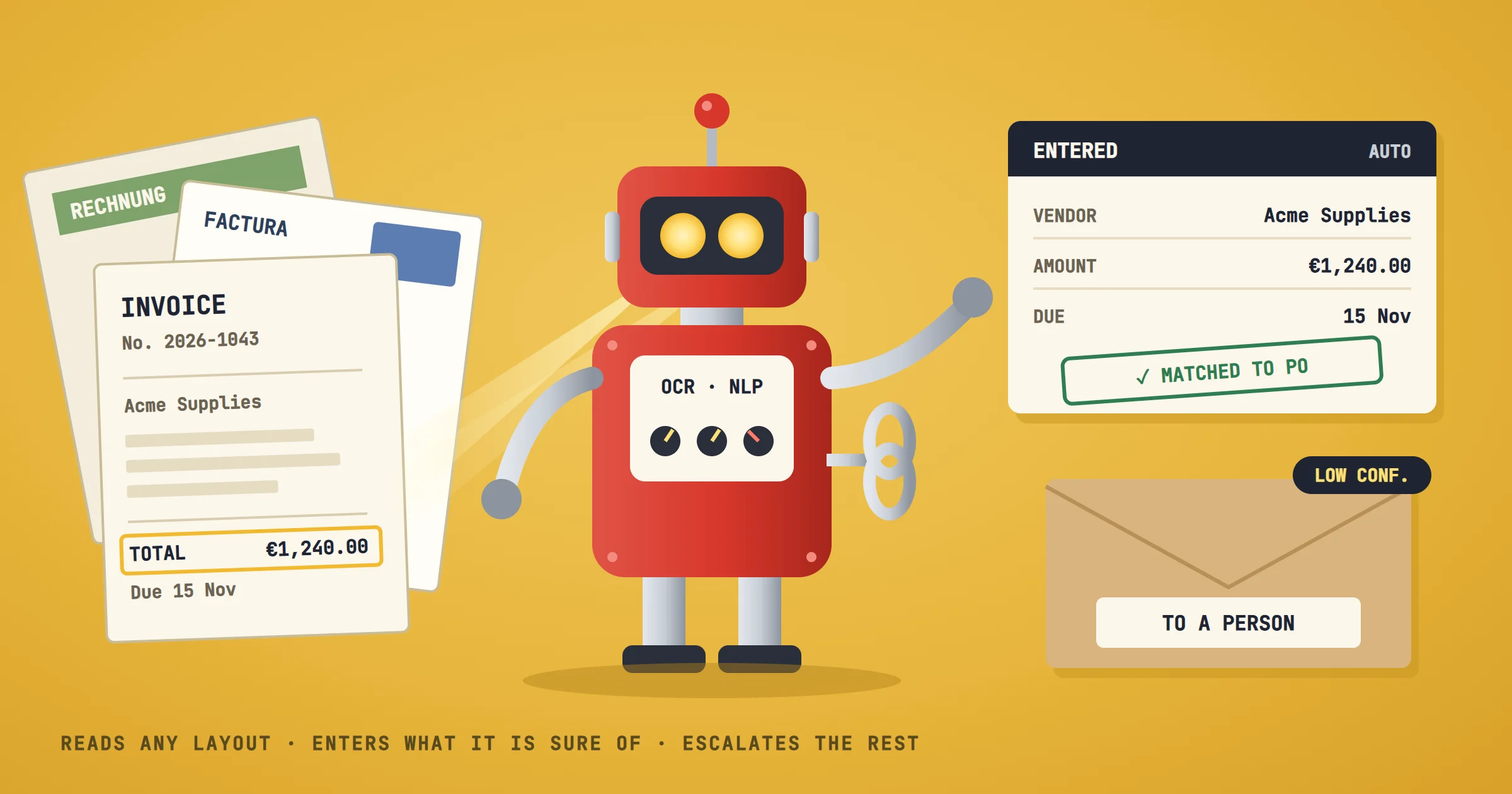
A common example: an SME receives supplier invoices by email. A basic RPA bot can download attachments and enter data into accounting software if the invoice format never changes. An IRPA system can read the invoice with OCR, extract the vendor name, amount, and due date even if the layout differs, then match it to a purchase order and route it for approval. The bot doesn't just follow steps; it understands the content.
That understanding comes from machine learning models trained on past invoices, from natural language processing that parses the email body, or, more and more often, from a language model given the list of fields to extract. The key difference is that IRPA handles exceptions without human intervention in many cases. If the AI is confident, it processes the invoice. If not, it escalates to a person with the relevant context attached.
What IRPA Is Not
IRPA is not a replacement for human judgment in complex, high-stakes decisions. It doesn't learn on its own without training data. And it doesn't eliminate the need for process documentation. In fact, the opposite: IRPA requires a clearer process definition than manual work, because a bot can't improvise.
The Robotic Part: Screens or APIs
The word robotic matters. A classic RPA robot works the way a person does: it opens an application, reads the screen, clicks and types. That is the only way in when the software has no API, as with an old desktop accounting package or a supplier portal with no export. When the software does have an API, a workflow tool such as n8n or Make talks to it directly, which is faster and breaks less often than a robot reading screens.
In our projects, we start from the API and keep the screen robot for the systems that leave no other way in. If you work in Microsoft 365, Power Automate also runs desktop robots of this kind, with its Process plan at $150 per bot per month.
How Intelligent Robotic Process Automation Works in Practice
Implementing IRPA follows a sequence that starts with process selection and ends with monitoring. Each step has a specific deliverable, and skipping one usually causes failure.
Step 1: Choose a process with high volume and clear rules
The best candidates are repetitive, rule-based, and involve structured or semi-structured data. Invoice processing, order entry, report generation, and data migration are typical. Avoid processes that require frequent human judgment calls or that change often.
Step 2: Document the current workflow
Write down every step, including exceptions. Who does what, when, and with which tool? This documentation becomes the blueprint for the bot. If you can't document it, you can't automate it.
Step 3: Identify the AI components needed
Does the process involve reading documents? You'll need OCR and possibly NLP. Does it require classification? A machine learning model. Does it need to extract specific fields? Information extraction. Only add AI where rules fail; over-engineering is a common mistake.
Step 4: Build a proof of concept
Start with a small subset of the process, maybe one type of invoice or one customer. Use a tool like n8n or Make to build the workflow, and integrate the AI model via API. Test with real data, but in a sandbox.
Step 5: Validate and measure
Compare the bot's output to human output. Measure time saved, error rate, and exception rate. If the bot escalates too many cases, the AI isn't good enough. If it makes errors, the rules need refinement.
Step 6: Deploy and monitor
Move to production with logging and alerts. Monitor the bot's performance continuously, because data drifts and processes change. Assign an owner who reviews the logs weekly.
This sequence is not theoretical. It is the one we follow at OptimizIA.xyz with SME clients: a diagnostic to choose and document the process, a proof of concept on real data, then an MVP, 13 days on average after a validated PoC. The goal is to hand over a working system, not to create a dependency.
A Real Example From Our Work
Our own newsletter runs on the same split. Every Thursday at 8:00, an n8n workflow reads about thirty news sources, selects nine articles, writes the issue and sends it, with no proofreading step. The AI layer handles the variability: it reads and chooses. The deterministic layer executes: the model only returns article identifiers, and the code places the links it collected, so an invented link is impossible by construction. An issue that fails validation does not go out; it raises an alert instead. The first scheduled issue went out on October 8, 2026, in under two minutes. Our article on workflow marketing automation describes the whole chain.
Comparing IRPA Tools and Approaches
Not all IRPA tools are equal, and the right choice depends on your team's technical skills, budget, and integration needs. The table below compares common options for SMEs.
| Tool/Approach | AI Capabilities | Ease of Use | Integration | Cost Model | Best For |
|---|---|---|---|---|---|
| n8n (self-hosted) | Can call AI APIs (OpenAI, Hugging Face) for NLP, OCR via external services | Medium: visual workflow builder, some technical setup | Extensive: 2,000+ integrations, custom API calls | Free for self-hosted, paid cloud from €20/month | SMEs with some technical staff, data privacy concerns |
| Make (formerly Integromat) | AI modules for text parsing, image recognition via third-party services | High: intuitive visual builder, no code | Wide: 3,000+ apps, webhooks | Free plan, paid from $9/month | Non-technical teams, quick automations |
| UiPath | Built-in AI Center: document understanding, NLP, ML models | Medium: drag-and-drop but steeper learning curve | Enterprise: SAP, Salesforce, legacy systems | Basic plan from $25/month, larger plans on quote | Larger SMEs with complex enterprise systems |
| Automation Anywhere | Document Automation (successor to IQ Bot), built-in ML | Medium: similar to UiPath | Enterprise focus | Paid plans on quote, free Community Edition with limits | Larger SMEs with dedicated automation team |
| Custom Python scripts + AI APIs | Full control: use any AI model, any library | Low: requires programming skills | Unlimited via code | Pay per API call, no license | SMEs with in-house developers, unique needs |
This table is not exhaustive, but it covers the spectrum from no-code to full-code. For most SMEs, n8n or Make with external AI APIs offers the best balance of cost and capability. Enterprise tools like UiPath and Automation Anywhere are overkill unless you have hundreds of employees and complex legacy systems. We build most often on self-hosted n8n, on Make when it fits better, and our comparison of AI powered workflow automation platforms covers UiPath and Power Automate in more detail.
Common Mistakes That Kill IRPA Projects
IRPA projects fail for predictable reasons. Avoiding these mistakes is more important than choosing the perfect tool.
- Automating a broken process. If the manual process is chaotic, with unclear responsibilities and frequent exceptions, automating it will just make the chaos faster. Fix the process first, then automate.
- Ignoring data quality. AI models are only as good as their training data. If your historical data is messy, unlabeled, or biased, the AI will make errors. Invest time in cleaning and labeling data before training.
- Over-automating. Trying to automate 100% of a process often leads to a fragile system that breaks on every edge case. Aim for 80% automation and design a smooth human handoff for the rest.
- No monitoring or maintenance. A bot that runs unattended will eventually fail. Data formats change, APIs update, and business rules evolve. Assign an owner and schedule regular reviews.
- Underestimating change management. Employees may fear that automation will replace their jobs. Communicate clearly that the bot handles repetitive tasks, freeing them for higher-value work. Involve them in the design so they feel ownership.
The Hidden Cost of IRPA That Most Vendors Won't Mention
Most IRPA vendors focus on the software license cost. But the real cost is in process documentation, data preparation, and ongoing maintenance. A Forrester analysis found that for every dollar spent on RPA software, companies spent $3.41 on services to make it work (2019 figures). With an AI component, data preparation and testing come on top.
For an SME, this means the initial build is just the beginning. You need to budget for:
- Time to document processes (our diagnostic takes one to three weeks)
- Data cleaning and labeling for AI training
- Integration work with existing systems
- Ongoing monitoring and tweaking
- Training employees to work alongside the bot
To give you an order of magnitude, here are our own figures, published on our services page: software subscriptions and API usage usually come to a few tens of euros a month for an SME workload, a PoC or MVP starts at €1,500 excl. VAT, and copiloting, which covers the monitoring and tweaking, starts at €100 excl. VAT per month.
If you can't commit to these hidden costs, IRPA will disappoint. A better approach is to start with a small, well-defined process and scale only after proving value.
How to Decide If IRPA Is Right for Your SME
IRPA is not for every business. Ask yourself these questions:
- Do you have a repetitive process that consumes at least 10 hours per week of staff time?
- Does that process involve semi-structured data like invoices, emails, or forms?
- Can you document the process steps clearly, including exceptions?
- Do you have historical data to train the AI, or can you generate it quickly?
- Is there a champion in your organization who will own the project?
If you answered yes to most of these, IRPA could be a good fit, and our automation ROI calculator tells you whether the numbers work. If not, start with basic RPA or simple workflow automation using a tool like n8n or Make.
For a deeper look at how AI automation applies to small businesses, see our guide on AI automation for small businesses.
Frequently asked questions
What is the difference between RPA and intelligent RPA?
RPA follows fixed rules on structured data. Intelligent RPA adds AI components like OCR, NLP, and machine learning to handle unstructured data and make decisions. IRPA can process documents, classify emails, and extract information from varied formats.
How much does intelligent robotic process automation cost for an SME?
Costs vary widely. Using n8n or Make with external AI APIs usually comes to a few tens of euros per month in subscriptions and API usage, plus the build: at OptimizIA.xyz, a PoC or MVP starts at €1,500 excl. VAT. Enterprise tools like UiPath or Automation Anywhere sell their larger plans on quote. The hidden costs are in process documentation, data preparation, and maintenance.
Can IRPA work without any programming skills?
Yes, to a degree. No-code platforms like Make allow building simple IRPA workflows with drag-and-drop. However, for complex AI integrations or custom models, some technical skill is needed. Many SMEs use a hybrid approach: no-code for the workflow, and a developer for the AI part.
What processes are best suited for IRPA in an SME?
Invoice processing, order entry, report generation, customer onboarding, and data migration are common candidates. The process should be high-volume, rule-based, and involve semi-structured data. Avoid processes that require frequent human judgment or that change often.
How long does it take to implement IRPA?
A proof of concept for a single process takes a few weeks: at OptimizIA.xyz, the sprint from PoC to MVP takes two to five weeks, and 13 days on average separate a validated PoC from an MVP in production. The timeline depends on data quality, integration complexity, and team availability.