
If you first need the basics, our guide explains what is workflow automation in plain terms. This page compares one tool, Power Automate, with the two we use most.
Where we stand. OptimizIA.xyz builds most often on self-hosted n8n, and on Make when it fits better; none of our case studies runs on Power Automate. Read this comparison with that in mind: we say when Power Automate is the better choice, and it sometimes is.
Verdict: Power Automate wins inside Microsoft, loses outside
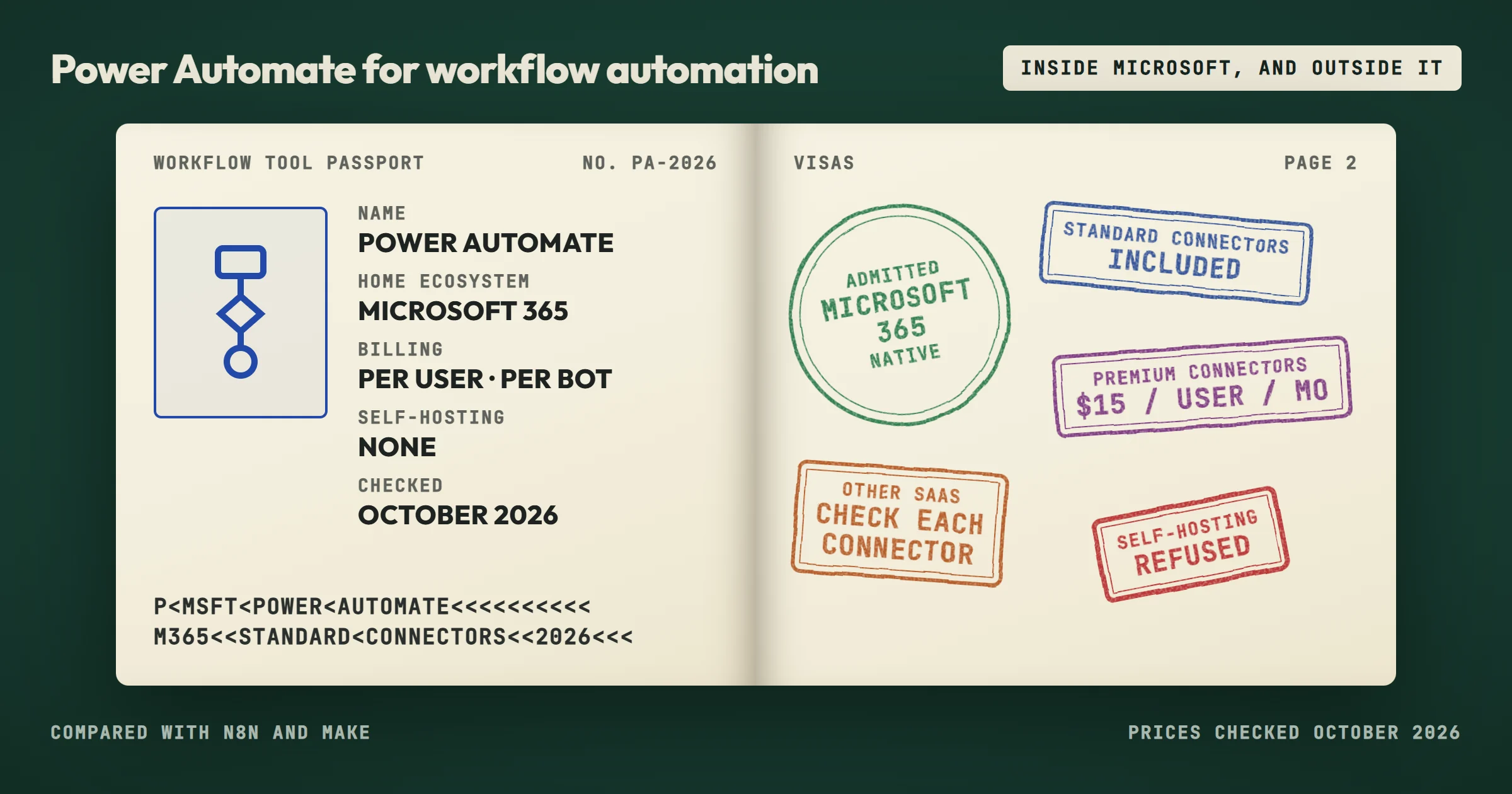
Power Automate for workflow automation is the obvious choice when your company already runs on Microsoft 365: work accounts can create cloud flows with standard connectors at no extra cost. The connectors to SharePoint, Outlook, Teams, and Excel are native, and you can build a simple approval flow in an afternoon. That is a real advantage. If your workflows live entirely inside the Microsoft ecosystem, Power Automate is often the fastest path to a working automation.
Outside that ecosystem, the picture changes. Power Automate's connectors to non-Microsoft tools exist, but many are published by the app's vendor or by independent publishers rather than by Microsoft, and their depth varies more than the native integrations you get with n8n or Make. For example, syncing data between a CRM like HubSpot and a project tool like Trello can work, but you depend on how complete each connector is. SMEs that combine tools from several vendors will hit these rough edges quickly.
A second issue is cost. As soon as a flow needs a premium connector, such as Salesforce, SQL Server or a plain HTTP call, the people who build and run it need Power Automate Premium, at $15 per user per month billed annually, or the flow needs a Process license at $150 per month. That amount recurs forever. n8n can be self-hosted with no license fee, and Make charges by credits consumed, not by user. For a small business, that difference matters more than the initial convenience of staying inside Microsoft.
- Power Automate: your tools are all Microsoft 365, and your flows are approvals, notifications and document routing.
- n8n: you want self-hosting, custom code or high volume without per-user fees.
- Make: a non-technical team connecting many SaaS tools.
Selection criteria: what actually matters for an SME
When you compare Power Automate for workflow automation with n8n and Make, ignore the feature lists on vendor websites. They all claim to do everything. Instead, look at five criteria that determine whether an automation tool will survive contact with your real business processes.
Connector depth for the tools you already use
If your team lives in Microsoft 365, Power Automate has the deepest native connectors. If you use Google Workspace, Airtable, or a niche CRM, n8n and Make often have better support. Make has a visual builder that many non-technical users find easier than Power Automate's flow designer, while n8n appeals to teams that want to self-host and control their data.
Pricing model
Power Automate charges per user, and premium connectors require the Premium license or a Process license on the flow. Make charges per credit, one credit per module run by default, which can be cheaper for low-volume workflows but expensive for high-frequency tasks. n8n publishes its code under a fair-code license and is free to self-host, but you need someone to maintain the server. For an SME without a dedicated IT person, that maintenance cost is real.
Error handling and debugging
When a workflow fails, you need to know why. Power Automate keeps a run history with the inputs and outputs of each action, lets you resubmit a failed run, and lets you decide what happens after a failed step with its configure run after setting. Make's visual execution log is clearer. n8n gives you full control over error workflows, which is powerful but requires more technical skill. On our own lead monitoring system, built on n8n, a failed run sends an alert email and writes nothing rather than half a table.
Learning curve
Power Automate is often taught in Microsoft training, so your team may already have some familiarity. Make's drag-and-drop interface is intuitive for beginners. n8n has a steeper learning curve but rewards you with flexibility.
Vendor lock-in
Power Automate ties you to Microsoft's cloud and licensing: a flow can be exported as a package, but only another Power Automate environment can import it. n8n can be self-hosted, so you own the tool. Make is a cloud service, but you can export your scenarios as JSON blueprints. For SMEs that worry about being trapped, n8n is the safest choice. Our guide to cloud based workflow automation lists where each platform stores its data.
Comparison table: Power Automate vs n8n vs Make
| Criteria | Power Automate | n8n | Make |
|---|---|---|---|
| Best for | Microsoft 365-centric teams | Self-hosting, data control | Visual builders, non-technical users |
| Pricing model | Per user (Premium) or per bot (Process); standard connectors included with Microsoft 365 | Free self-hosted, cloud billed per execution | Per credit, tiered plans |
| Connector depth | Excellent for Microsoft, uneven elsewhere | 2,367 integrations, strong for APIs | 3,500+ apps, strong for SaaS |
| Learning curve | Moderate, familiar to Microsoft users | Steep, requires technical skill | Gentle, visual interface |
| Error handling | Run history, resubmit, configure run after | Full control, custom error workflows | Visual execution log, error handlers |
| Self-hosting | No (desktop flows run on your PCs) | Yes | No |
| Vendor lock-in | High, tied to Microsoft cloud | Low, self-hostable | Medium, exportable blueprints |
We checked these figures on each vendor's site in October 2026. Power Automate still prioritizes the Microsoft stack. n8n's community is growing, and Make remains a favorite for marketing and sales teams that need to connect many SaaS tools. Our shortlist of AI powered workflow automation platforms adds Zapier, UiPath and a custom build to the comparison.
Who should choose each option
Power Automate
Power Automate for workflow automation is the right choice if your company already uses Microsoft 365 for email, files, and collaboration, and if your workflows are mostly internal approvals, notifications, and document routing. A typical example is an SME that wants to automate invoice approval: when a new invoice arrives in a SharePoint folder, Power Automate can send an approval request to the finance manager and then update an Excel log. SharePoint, Approvals and Excel Online are standard connectors, so this flow runs on the Microsoft 365 licenses you already pay for. That works well and saves real time.
n8n
n8n is the right choice if you have a technical person on the team, or if you want to avoid recurring per-user fees. It shines when you need to connect self-hosted tools, internal APIs, or databases. For instance, an SME that runs its own CRM on a VPS can use n8n to sync leads from a web form to the CRM and then send a Slack notification, all without paying for cloud connectors. It is also what we run in production: our lead monitoring reads 25 industry feeds every morning for an influence agent who reports saving over two hours a day. Our n8n workflow automation guide covers the method.
Make
Make is the right choice if your team is non-technical and uses a wide range of SaaS tools. Its visual builder is the most approachable of the three, and the large library of app integrations means you can often build a workflow without writing any code. A marketing agency might use Make to watch for new rows in a Google Sheet, then create tasks in Asana and send a summary email. Our Make workflow automation guide shows how to build scenarios that keep running.
If you are unsure, start with a small pilot. Build the same workflow in two tools and compare the time it takes, the error rate, and how your team feels about maintaining it. That pilot will tell you more than any comparison article. Time saved, volume processed and error rate are the three numbers we track on every automation we ship.
Price ranges: what drives the cost
Entry prices checked in October 2026, billed annually:
- Power Automate: free with standard connectors for Microsoft 365 work accounts; Premium at $15 per user per month; Process at $150 per bot per month for unattended flows.
- n8n: the self-hosted Community Edition is free; n8n Cloud Starter costs €20 per month for 2,500 executions, Pro €50 per month for 10,000.
- Make: a free plan with 1,000 credits per month; Core at $9 per month for 10,000 credits.
Power Automate's pricing is straightforward: you license each user who needs premium features, every month, whether they use them or not. For a small team, the cost is predictable but recurring. If ten people build or run flows with premium connectors, you pay for ten Premium licenses every month.
Make's pricing is based on credits: by default, one credit per module run. A simple workflow with five steps that runs 100 times per day consumes about 500 credits per day, around 15,000 per month, already more than the Core plan's 10,000. For low-volume workflows, Make can be very cheap. For high-volume workflows, the cost can climb quickly.
n8n is free if you self-host, but you need a server. A small VPS costs a few dollars per month, and you need someone to install updates and monitor the service. If you use n8n's cloud version, you pay a monthly fee based on the number of workflow executions, and one execution is one full run, however many steps it has: the same workflow counts 3,000 executions per month, just above the Starter plan. For an SME that already has a server or a technical person, self-hosting n8n is often the cheapest option in the long run.
Beyond the tool cost, consider the time your team spends building and maintaining workflows. A tool that is cheap but hard to use can cost more in labor than an expensive tool that your team adopts quickly. That hidden cost is often the deciding factor.
Common questions about Power Automate for workflow automation
Is Power Automate included with Microsoft 365?
Partly. Microsoft 365 plans include Power Automate with standard connectors, which covers flows between SharePoint, Outlook, Teams and Excel. Premium and custom connectors require Power Automate Premium or a Process license. Check your specific plan to see what is included.
Can Power Automate connect to non-Microsoft tools?
Yes, Power Automate has connectors for many non-Microsoft tools, including Google Drive, Slack, and Salesforce, the last one premium. However, the quality of these connectors varies. Some are published by Microsoft, some by the app's vendor, and some by independent publishers. Test the specific connector you need before committing to Power Automate.
Which tool is easiest for a non-technical user?
Make is generally the easiest for non-technical users because of its visual builder and large library of pre-built templates. Power Automate is also approachable if you are familiar with Microsoft products. n8n has the steepest learning curve but offers the most control.
Can I switch from Power Automate to n8n or Make later?
Yes, but it requires rebuilding your workflows. There is no automatic migration tool. Document each Power Automate flow, its trigger, steps and connections, then recreate it in the new tool. The time required depends on the complexity of your workflows.
A realistic path forward
If you are evaluating Power Automate for workflow automation, do not let the Microsoft brand name make the decision for you. List the tools your team uses every day. If they are all Microsoft, Power Automate is a safe choice. If they are a mix, test n8n or Make with a small workflow before committing.
One common mistake is to build a complex workflow in Power Automate, then discover that a critical connector is premium or unreliable, or that the per-user cost is too high. That mistake is avoidable with a short pilot. Build the same workflow in two tools, run it for a week, and compare the results. The tool that your team can maintain without frustration is the right tool.
For SMEs that want expert help, OptimizIA.xyz offers a PoC and MVP from €1,500 excl. VAT, over two to five weeks. We build a controlled-scope automation, most often in n8n, document it, and train your team. You keep everything that is built: workflows, configuration and documentation are handed over, with no proprietary lock-in. When you do not yet know which process to start with, an AI & Knowledge Diagnostic from €1,000 excl. VAT maps your workflows and recommends the right tool. The detail is on our services page.
Frequently asked questions
Is Power Automate cheaper than n8n or Make?
It depends on your usage. Power Automate charges per user once you need premium connectors, which is predictable but recurring. n8n can be free if you self-host, and Make charges per credit. For low-volume workflows, Make may be cheapest. For a team of many users, Power Automate's per-user cost can add up.
Can I use Power Automate without coding?
Yes, Power Automate has a visual designer that does not require coding for basic workflows. However, complex workflows with conditions and loops may require some understanding of logic. Make's visual builder is often easier for non-coders.
Does OptimizIA.xyz work with Power Automate?
Our builds run most often on self-hosted n8n, and on Make when it fits better; none of our case studies runs on Power Automate. If all your tools are Microsoft 365 and your flows are approvals and notifications, Power Automate on the licenses you already pay for is often the simpler choice, and we will tell you so. When your stack mixes vendors, we recommend a tool that is not tied to a single one.
What is the biggest hidden cost of Power Automate?
The biggest hidden cost is the premium connectors. Many useful connectors, such as Salesforce, SQL Server or the generic HTTP action, require Power Automate Premium for the people who build and run the flow, or a Process license on the flow. If your workflow relies on these connectors, your monthly cost can increase significantly.
How long does it take to learn Power Automate?
For basic flows, a few hours. For complex workflows with multiple conditions and error handling, expect a few days of learning. If you are already familiar with Microsoft tools, the learning curve is shorter.