
This shortlist comes from practice. At OptimizIA.xyz, we build and maintain these workflows for SMEs, and one self-hosted n8n instance runs the production workflows of three of our projects. The examples below come from systems we built ourselves.
What is workflow automation?
Workflow automation is software that carries out the repeated steps of a process for you, in a set order, so that nobody has to copy data from one app to another or remember the next step. Business process workflow automation applies the same idea to a whole process, such as handling a new lead or chasing an unpaid invoice, rather than to a single task.
How a workflow is built
Every tool in this article uses the same three building blocks:
- A trigger: the event that starts the workflow, such as a form submission, a new email or a schedule.
- Actions: the steps the tool performs in your apps, such as creating a CRM record or sending a message.
- Logic: the conditions, filters and loops that decide which action runs, with an AI step when the input has to be read or sorted.
Common use cases in an SME
- Sales: send every new lead to the CRM and notify the right person.
- Marketing: add new subscribers to the right email sequence and report on campaign results.
- Finance: send invoice reminders and copy payment data into the accounting tool.
- HR: run the same onboarding checklist for every new hire.
- Operations: assemble a report or a monitoring digest on a schedule.
Two examples from our own work. A reporting chain collects market data, has several AI agents score it, then lays out and distributes an HTML and a PDF report every week, with no manual step in between. A lead monitoring system reads 25 industry feeds every weekday morning, ranks each signal in three tiers and emails a written report.
What you gain
- Time: the repetitive middle of a process runs without you.
- Fewer errors: nothing is retyped, so nothing is mistyped or forgotten.
- Speed: a new lead gets an answer in minutes, not the next day.
- Consistency: the process runs the same way every time, and each run leaves a trace you can check.
The verdict: our shortlist
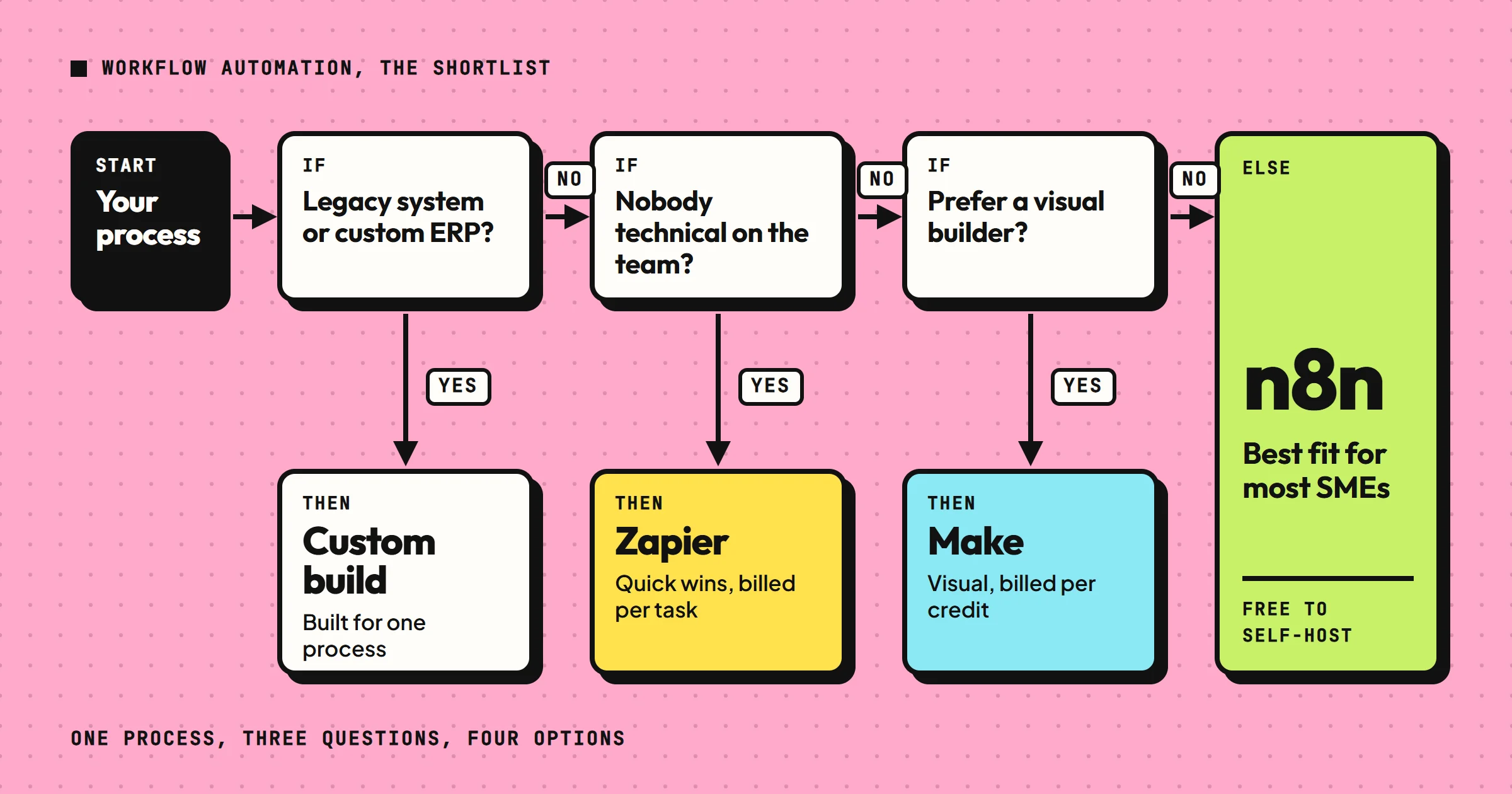
For most SMEs, the best business process workflow automation tool is n8n. Its code is published under a fair-code license, it is self-hostable, and its Community Edition is free to run on your own server. You can build complex workflows without paying per operation, which keeps costs predictable. If you need a tool that non-technical staff can use quickly, Zapier is the safer choice, but its pricing scales with usage and can become expensive. Make (formerly Integromat) sits between the two: more visual than n8n, more affordable than Zapier for high-volume tasks, but with a steeper learning curve than Zapier.
Our comparison of open source workflow automation tools explains what n8n's fair-code license allows.
Custom development, whether in-house or through an agency, is the right call only when your processes are highly specific or you need to integrate legacy systems. For example, if you run a manufacturing business with a custom ERP, off-the-shelf tools may not connect. In that case, a custom build using n8n or a similar platform, possibly with agency support, is the way to go.
Selection criteria
When comparing business process workflow automation options, focus on these criteria:
- Ease of use: Can a non-developer build and maintain workflows? Zapier is the easiest; n8n requires some technical comfort.
- Pricing model: Per task, per credit, per execution, or flat fee? n8n's self-hosted version is free; Zapier charges per task.
- Integration depth: Does it support your specific apps? Check the app directory.
- Flexibility: Can you write custom code or use advanced logic? n8n allows JavaScript; Zapier is more limited.
- Support and community: Is there documentation, a forum, or paid support? n8n has an active community; Zapier has official support.
- Data privacy: Do you need to keep data on your servers? Self-hosting n8n gives you full control.
These criteria matter more than flashy features. A tool with a huge app directory but a confusing interface will slow you down. A cheap tool that lacks a critical integration is useless.
Comparison table
| Tool / Option | Best for | Pricing model | Ease of use | Flexibility | Self-host option |
|---|---|---|---|---|---|
| n8n | Technical users, complex workflows, cost control | Free self-hosted; cloud from €20/month | Moderate | High (JavaScript) | Yes |
| Make | Visual thinkers, medium complexity | Free plan; paid from $9/month | Moderate | Medium | No |
| Zapier | Non-technical users, simple automations | Free plan; paid from $19.99/month | High | Low | No |
| Custom build (agency) | Deep integrations, legacy systems, no in-house skills | Project-based (with us, PoC or MVP from €1,500 excl. VAT) | Depends on build | Very high | Yes, if built on n8n |
Note: Prices are indicative and change; check vendor sites. Tool prices are entry plans billed annually, as listed in October 2026. The agency figure is the starting price published on our services page for a PoC or MVP.
Who each option is for
n8n
n8n is for businesses with some technical skill, or willingness to learn. If you have a developer on staff or a technically minded founder, n8n gives you the most power for the least money. It is also the best choice if you handle sensitive data and want to self-host.
It is what we run ourselves, in Docker, on a server we manage. The license costs nothing. The real work is maintenance: updates, error handling and keeping a version of every workflow.
Make
Make suits teams that prefer visual workflow builders. If you find Zapier too limiting but n8n too code-heavy, Make is the middle ground. It is popular among marketers and operations staff.
Zapier
Zapier is for non-technical users who need quick wins. If you want to connect two apps in an afternoon without reading docs, Zapier is the answer. But watch the task count: a busy workflow can cost hundreds per month.
Our guide to Zapier as a workflow automation tool shows how we map, build and safeguard every Zap we hand over.
Custom build with an agency
A custom build with an agency is for businesses with complex needs or no time to learn tools. If you need to automate a core process that spans multiple systems, an agency can design and build it for you. At OptimizIA.xyz, for example, PoC and MVP builds start at €1,500 excl. VAT, and copiloting from €100 excl. VAT per month. This makes sense when the process is critical and you want it done right.
If you go that way, our shortlist of business process automation companies explains how to compare providers.
Price ranges
Pricing for business process workflow automation varies widely:
- n8n: Self-hosted n8n is free, but you need a server and someone to maintain it. Cloud n8n starts around €20 per month, billed annually, for 2,500 workflow executions.
- Make: Make's free plan allows 1,000 credits per month, the unit that replaced operations in August 2025; paid plans start around $9 per month for 10,000 credits.
- Zapier: Zapier's free plan allows 100 tasks per month; paid plans start at $19.99 per month, billed annually, for 750 tasks.
- Custom builds: For custom builds, expect project fees. Ours are published on our services page: the AI & Knowledge Diagnostic starts at €1,000 excl. VAT, a PoC or MVP at €1,500 excl. VAT, and copiloting at €100 excl. VAT per month.
Those are starting prices. The diagnostic and the build are quoted as a fixed fee once the scope is agreed.
What makes the price vary? The number of steps in a workflow, the frequency of execution, the number of integrations, and whether you need custom code. A simple lead notification might cost nothing on Zapier's free tier. A multi-step order processing workflow with custom logic could cost hundreds per month on Zapier, but be free on self-hosted n8n. That is why understanding your volume is key.
The billing unit matters more than the sticker price
Each tool counts something different:
- Zapier counts tasks: every action a workflow completes is one task.
- Make counts credits: in most cases, every module that runs uses one credit.
- n8n counts executions: one full run of a workflow is one execution, however many steps it has.
Our own numbers show the gap. The lead monitoring system mentioned above runs on self-hosted n8n: each morning run counts as one execution, and the monthly bill is the server plus a few euros of AI. Built on a per-task plan, every action on every article would be counted, which means well over a thousand tasks a month for that single workflow.
How to choose without wasting time
- Start with a process audit. List the workflows you want to automate, the apps involved, and the volume.
- Then test the free plans of Make and Zapier and the free trial of n8n Cloud with one simple workflow. See which interface you prefer.
- If you get stuck, check the community forums.
- If you still struggle, consider hiring an agency for a diagnostic. We offer a free 20-minute discovery call, which can help you decide.
Implementation challenges to plan for
A common mistake is to automate a broken process. If your current workflow is chaotic, automating it will just make the chaos faster. Fix the process first, then automate. Another mistake is to ignore maintenance. Workflows break when APIs change or apps update. Assign someone to monitor them.
Three more challenges come up on almost every build:
- Silent failures: the dangerous breakdown is the run that "succeeds" while writing nothing. Our lead monitoring workflow sends its report every day it runs, even with zero signals, so that "nothing to report" is never confused with "broken", and a separate alert fires if a feed dies.
- Exceptions: decide who handles the cases the workflow cannot, and how that person is told.
- Version history: we export every workflow as JSON after each change and keep it with the client's documentation, so any earlier version can be restored.
This is the part our copiloting covers once a workflow is live: monitoring, fixes and optimizations, from €100 excl. VAT per month.
Frequently asked questions
What is the cheapest way to automate business processes?
Self-hosted n8n is free, but you need technical skills and a server. Zapier and Make have free plans, but they are limited. For low volume, Zapier's free plan may suffice.
Do I need to know how to code for workflow automation?
No. Zapier and Make are designed for non-coders. n8n requires some technical comfort, but you can learn it. If you want zero coding, use Zapier or hire an agency.
How long does it take to set up a workflow automation?
A simple automation can be set up in an afternoon with Zapier. Complex workflows with custom logic may take days or weeks. An agency can build a PoC or MVP in 2 to 5 weeks: that is our published timeline, and going from PoC to a working MVP takes us 13 days on average.
Can I automate workflows across different departments?
Yes. Workflow automation works for marketing, sales, operations, HR, and finance. The key is to map the process and choose the right triggers and actions.
What if my tools are not supported by n8n or Zapier?
Check the app directories. If your tool is missing, you can use webhooks or APIs. For legacy systems, a custom build may be necessary.