
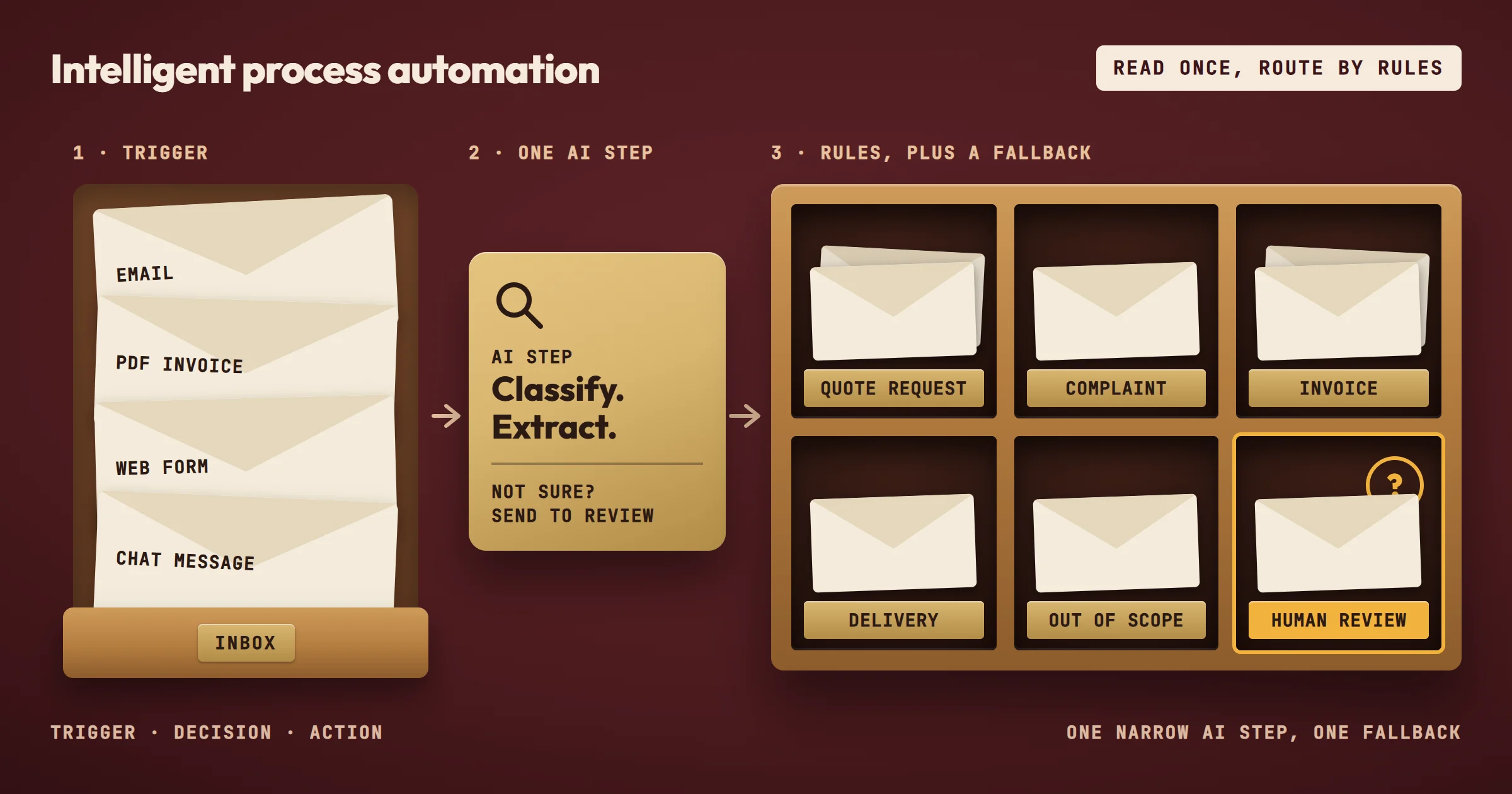
This guide is about how such a workflow is designed. If you are still deciding whether intelligent automation is worth it for your company at all, start with our framework for SMEs.
What Intelligent Process Automation Actually Means
IPA sits between two older ideas. The first is workflow automation, where a process moves through defined steps and triggers actions in tools like n8n or Make. The second is AI assistance, where a model reads, classifies, or summarizes content. IPA combines them: the workflow handles the sequence, the AI handles the moments where the next step depends on what the content means.
A practical example is an incoming email with an attached invoice. A basic workflow can detect the email, extract the attachment, and save it to a folder. That is automation. IPA goes further: the workflow reads the invoice content, identifies the supplier, checks whether the amount matches an existing purchase order, and routes the invoice to the right person for approval or flags it for review. The AI part is not replacing the whole process. It is replacing the reading and matching step that used to take a person several minutes per document.
For SMEs, the distinction matters because many processes are not fully predictable. A customer request might be a complaint, a quote request, or a delivery question. A fixed rule cannot always tell them apart. IPA allows the workflow to classify the message first, then choose the correct path. The automation still follows rules, but the rules can now include a classification step that handles variation.
Why the Term Causes Confusion
The phrase "intelligent process automation" is used by large software vendors to describe enterprise platforms. That creates a wrong impression for smaller companies. You do not need a platform migration or a six-month project to apply IPA. The core idea works at a smaller scale: one process, one workflow, one AI step where it adds value. The intelligence comes from the design of the process, not from the size of the software.
A common mistake is to assume IPA means the AI decides everything. In practice, the most reliable IPA implementations keep the AI in a narrow role. The AI classifies, extracts, or suggests. The workflow enforces the sequence, the approvals, and the fallback when the AI is not confident. This separation is what makes the system auditable and safe enough for business use.
How IPA Works in a Small Business Context
The method is simpler than the terminology suggests. You start with a process that is repeated often, has a clear trigger, and currently requires someone to read, compare, or route information. Then you break the process into three layers.
- Trigger and data capture. This could be a new email, a form submission, a file dropped in a folder, or a row added to a spreadsheet. The workflow starts here and collects the raw input.
- Decision layer. This is where IPA differs from basic automation. The workflow may call an AI step to classify the request, extract key fields from a document, or compare the content against a set of criteria. The output of this step is structured data: a category, a priority, a supplier name, a yes or no.
- Action layer. Based on the structured data, the workflow updates a CRM, sends a notification, creates a task, writes to a database, or asks a human to confirm. The action layer follows fixed rules. It does not need to be intelligent because the intelligence already happened upstream.
A Concrete Sequence
Imagine a small professional services firm that receives project inquiries through a website form. Without automation, someone reads each submission, decides whether it fits the firm's services, and replies or forwards it. With IPA, the workflow receives the form data, uses an AI step to classify the inquiry type and extract the mentioned budget range or timeline, then routes it. High-fit inquiries go to a priority list. Unclear ones go to a review queue. Out-of-scope ones receive a predefined response. The person still handles the final judgment, but the reading and sorting time drops.
This sequence works because the AI step has a narrow job. It does not write the response. It does not decide to accept the project. It classifies and extracts. The workflow then applies rules that the business controls.
Where the AI Step Adds Real Value
The AI step is worth adding only when the process requires understanding content that varies. If the input is always structured, such as a form with fixed fields, a basic workflow is enough. If the input is an email, a PDF, a chat message, or a document with different layouts, the AI step earns its place.
The same logic applies to routing. If every request goes to the same person, there is nothing to route. If requests must go to different teams based on topic, language, or urgency, classification becomes valuable. The key is to add AI where a rule would be brittle, not to add AI for its own sake.
Comparing IPA Approaches for SMEs
The table below compares common ways to introduce intelligent process automation in a small business. The options are not mutually exclusive. Most companies start with one and expand.
| Approach | Best for | Main constraint | Typical AI role | Control level |
|---|---|---|---|---|
| Workflow-first with one AI classification step | Processes with varied incoming text or documents | Requires clear categories and enough examples | Classify, extract, or route | High |
| Document parsing and data entry automation | Invoices, orders, forms received as PDF or email | Document formats vary, needs testing on real samples | Extract fields, validate against rules | High |
| Human-in-the-loop review queues | Processes where errors are costly or judgment is subjective | A person must still review flagged items | Suggest, flag, pre-fill | Very high |
| Full end-to-end automation with AI decisions | Stable processes with low exception rates | Needs strong monitoring and fallback paths | Decide within defined limits | Medium |
| AI assistant connected to internal knowledge | Repeated internal questions or support requests | Requires curated knowledge base, not raw files | Retrieve and summarize | Medium |
The workflow-first approach is the most realistic starting point for an SME. It limits the AI to one step, keeps the process observable, and produces measurable time savings without a large upfront investment. Full end-to-end automation with AI decisions is possible but only after the process has run with human review long enough to expose edge cases.
The AI assistant is what the industry calls RAG, retrieval-augmented generation: level two of the six levels of AI use we teach in our AI training workshop. To choose the tool behind each approach, our shortlist of AI powered workflow automation platforms compares n8n, Make, Zapier, UiPath, Power Automate and a custom build.
Mistakes That Make IPA Projects Fail
- An unstable process. The most common failure is starting with a process that is not stable. If the team does not agree on how the process should work, automation will not fix it. It will encode the confusion. Before building anything, the process needs a documented sequence and a clear owner.
- Too much AI too early. Another frequent mistake is giving the AI too much responsibility too early. When the AI writes replies, makes final decisions, or acts without a review step, small errors become visible to customers. A safer pattern is to let the AI classify, extract, or suggest, and let the workflow or a person execute the final action.
- No fallback path. A third mistake is ignoring the fallback path. Every AI step needs a defined behavior when the confidence is low or the input does not match any known category. Without a fallback, the workflow either stops silently or sends wrong information downstream. The fallback is often a simple queue for human review, but it must exist.
Underestimating the Knowledge Component
IPA projects often fail because the business knowledge is scattered. The AI step needs examples of what a correct classification looks like. If the team cannot agree on what counts as a high-priority request, the AI cannot learn it. This is why a knowledge-flow analysis before automation is useful. It maps where information enters, who interprets it, and what rules they apply. The automation then captures that interpretation instead of guessing. It is also why our co-founder Rémy Ginoux, after 25 years of industrial and digital transformation, starts every diagnostic with knowledge management rather than with the tool.
The same applies to internal knowledge used by AI assistants. If the source documents are outdated or contradictory, the assistant will produce inconsistent answers. The knowledge base must be curated before it is connected to a workflow. This is a constraint, not a technical limitation. The AI can only retrieve what exists.
Choosing the Wrong Process
Some processes are poor candidates for IPA. A process that happens once a month, involves highly sensitive decisions, or changes frequently may not justify the setup effort. The best candidates are processes that:
- occur daily or weekly,
- follow a repeatable pattern,
- and currently consume visible staff time.
Lead monitoring and automated reporting are examples where the trigger is regular and the output is structured enough to measure.
Why the AI Step Should Stay Narrow
The strongest IPA implementations keep the AI in a small, well-defined role. This is the opposite of what many vendors suggest. The vendor pitch often implies that more AI coverage means more value. In practice, each additional AI decision point adds failure modes, monitoring burden, and review effort.
A narrow AI step is easier to test. You can run it against past examples and check whether the classification matches what a person would have done. You can adjust the categories without touching the rest of the workflow. You can also explain to the team exactly what the AI does and what it does not do.
When the AI step is narrow, the workflow remains the source of truth for the process. The sequence, the approvals, and the data storage are explicit. The AI is a component inside that sequence, not a black box that replaces it. This makes the system easier to audit and easier to hand over to another person.
The Fallback Is Part of the Design
A fallback path is not an afterthought. It is a first-class part of the workflow. When the AI cannot classify a request with enough confidence, the workflow routes it to a review queue. When a document cannot be parsed, the workflow notifies the right person instead of failing silently. These paths are what make the automation trustworthy.
The fallback also creates a feedback loop. Items that land in the review queue show where the AI step needs more examples or better categories. Over time, the review queue shrinks, but it never disappears entirely. Some inputs will always be ambiguous, and the business should decide how to handle them.
A Real Example: Our Lead Monitoring
Our lead monitoring case study follows this pattern. For Paul Bergé Lemonnier, an influence agent, an n8n workflow collects 25 industry feeds every morning. The AI step has one job: a language model reads each article, keeps what is actionable, and ranks every retained signal Tier 1, 2 or 3 against four business relevance criteria. Everything around it is fixed rules: deduplication, one line per brand in a register, a table and a daily report.
The fallback is explicit. The report goes out every day, even with zero signals, so that "nothing to report" never looks like a breakdown, and a separate alert fires if a feed dies or the collection runs empty. In his words, published on our levers page, the system "saves me over 2 hours a day".
What a Realistic IPA Project Looks Like
A realistic project starts with a diagnostic phase. The goal is to identify one process where automation can remove repetitive reading, sorting, or data entry work. The diagnostic maps the current steps, the tools involved, and the decision points. It also estimates the time currently spent and the expected gain. This phase does not require building anything. It produces a shortlist of use cases with a clear recommendation.
The next phase is a proof of concept on a controlled scope. The workflow is built for a subset of the process, often with a limited number of categories or a single document type. The AI step is tested against real examples. The output is a working automation that the team can observe and validate. This phase typically takes two to five weeks, not months: 13 days on average for us, from PoC to a working MVP.
After validation, the workflow moves to production with monitoring and a review queue. The team tracks the time saved, the volume processed, and the error rate. Adjustments happen based on what the review queue reveals. New use cases are added gradually, using the same pattern: narrow AI step, clear fallback, measurable output.
What the Agency Builds
OptimizIA.xyz applies this method for SMEs, in three formats:
- AI & Knowledge Diagnostic, from €1,000 excl. VAT over one to three weeks: scoping workshops, knowledge-flow analysis, and priority use cases with gain estimates.
- PoC and MVP, from €1,500 excl. VAT: a working automation on a controlled scope, with an onboarding guide.
- Copiloting, from €100 excl. VAT per month: monitoring, fixes, and gradual rollout of new use cases.
We build most often on n8n, and on Make when it fits better, and the client keeps everything built: workflows, configuration, and documentation. There is no proprietary lock-in. Software subscriptions and API usage are paid directly to the providers, usually a few tens of euros per month for an SME workload. The detail is on our services page.
This matters because IPA projects often stall when the client depends on the provider for every change. Keeping the workflows and documentation means the internal team can understand, modify, and maintain what was built. The agency's role shifts to copiloting and continuous improvement, not permanent dependency.
What Most Guides Do Not Tell You
The biggest hidden cost in IPA is not the software or the initial build. It is the maintenance of the knowledge and categories that the AI step depends on. A classification step works well on the examples it was designed and tested with. When the business changes its services, its pricing, or its customer segments, the categories drift. Requests that used to be high-priority become normal. New request types appear. If nobody updates the examples and rules, the automation slowly becomes less accurate.
This drift is invisible at first. The workflow still runs. The AI still produces classifications. The errors appear in the review queue or, worse, in customer-facing actions. Teams often blame the AI when the real issue is that the business knowledge changed and the automation did not follow.
The practical response is to treat the AI step as a living component. It needs periodic review, just like a price list or a product catalog. The review does not require a data scientist. It requires someone who knows the process to look at recent examples, check the classifications, and update the categories when needed. If you cannot commit to that review, keep the AI step narrow enough that drift has limited impact.
The Difference Between Automation and Knowledge Management
IPA works best when the business separates two things: the workflow, which moves data and triggers actions, and the knowledge, which defines what the data means. The workflow is stable. The knowledge changes. When these two are tangled together, every business change requires a workflow change. When they are separated, the workflow stays the same and only the knowledge layer is updated.
This separation is why some IPA projects succeed while others become maintenance burdens. The successful ones treat the AI step as a replaceable component. The categories, examples, and rules can be updated without rebuilding the workflow. The unsuccessful ones hard-code the intelligence into the workflow itself, so every change requires technical intervention.
Frequently asked questions
What is the difference between IPA and RPA?
Classic RPA repeats fixed screen actions, such as copying data from one field to another. IPA adds an AI step that reads, classifies, or extracts meaning from unstructured content before the workflow continues. IPA handles variation; RPA assumes the input is always in the same place and format.
Does an SME need a large platform to use IPA?
No. A small business can apply IPA with a workflow tool like n8n or Make and one narrow AI step. The value comes from choosing the right process and designing a clear fallback, not from the size of the software.
How do you know if a process is a good IPA candidate?
The process should repeat often, have a clear trigger, and currently require someone to read or sort information before acting. If the input is always structured and the next step is always the same, basic workflow automation is enough. If the input varies and the routing depends on meaning, an AI step may help.
What happens when the AI is not confident?
The workflow should route the item to a human review queue. This fallback is part of the design, not an exception. It keeps errors from reaching customers and creates a feedback loop for improving the AI step over time.