
If you first need the basics, our guide explains what is workflow automation in plain terms. This page is about the next decision: which route to take.
What "enterprise" means here. Company-wide, across departments. It does not mean large-company budgets: OptimizIA.xyz works with SMEs, and the routes below are sized for them. Rémy Ginoux brings 25 years of industrial and digital transformation at Volvo Group, Airbus Atlantic and Solvay, including 244 expert communities run at Volvo Group. Romain Ben builds and maintains the workflows quoted on this page.
Verdict and shortlist first
Data moving between systems: n8n or Make
If your workflows span more than two systems, involve structured data, and need to run without someone clicking a button, a dedicated automation platform such as n8n or Make is the strongest starting point. It costs less than custom development, deploys faster, and leaves you with workflows you can inspect and modify.
Judgment on documents: an AI assistant with RAG
If your processes depend on unstructured text, document review, or decisions that currently sit in a senior employee's head, an AI assistant connected to your business data through retrieval augmented generation is the better fit. It does not replace the workflow layer. It handles the judgment step that pure automation cannot.
No internal capacity: a fixed-scope engagement
If your team has no internal capacity to build or maintain either, the practical choice is a fixed-scope engagement with an external team that hands over documentation, configuration, and training. That is the model OptimizIA.xyz applies: a diagnostic when you do not yet know where to start, then a proof of concept, then handover or copiloting. The handover matters more than the build.
Selection criteria
Enterprise workflow automation fails for predictable reasons. The selection criteria below reflect those failure modes, not a feature checklist.
Process stability
Automating a process that changes every quarter creates maintenance debt. A stable process with clear inputs and outputs is a good candidate. A process still being redesigned should wait.
Data location
Some workflows can run on cloud tools. Others touch customer data, contracts, or internal financials that must stay on your infrastructure or on servers in your own country. The automation platform has to respect that constraint from day one. Our guide to cloud based workflow automation lists where each platform stores its data.
Human exception rate
If a workflow needs a person to intervene on half the runs, the automation is a routing layer, not a time saver. Count the exceptions before you build.
Maintenance ownership
A workflow nobody can read becomes a liability. The team that builds it must hand over the configuration, the trigger logic, and the failure paths. Without that, you own a black box.
Measurement
You need a baseline for time spent, volume processed, and error rate before the build. The gain is the difference between the baseline and the post-deployment measurement. If nobody can state the baseline, the project is not ready.
Comparison table
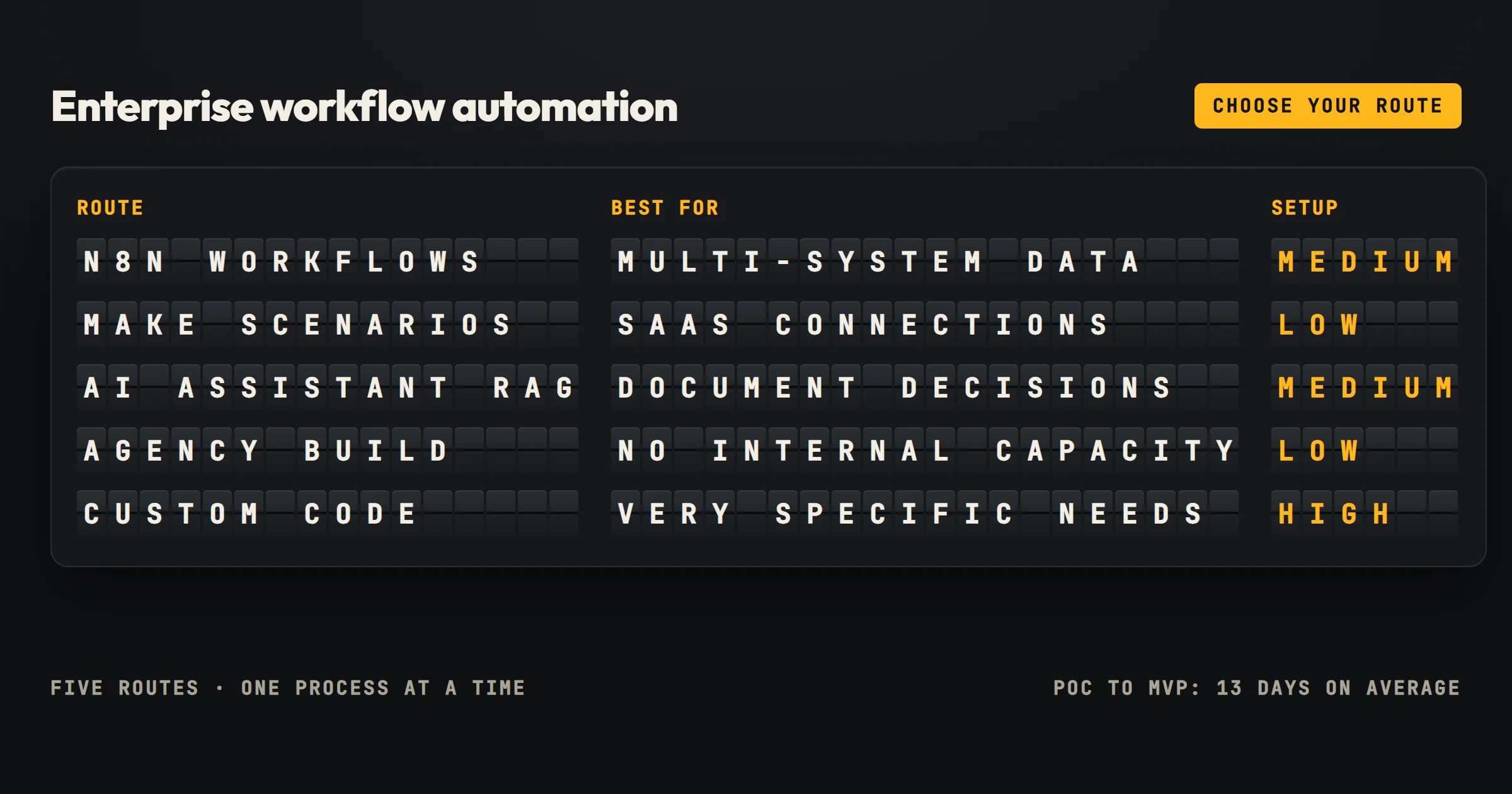
| Option | Best for | Setup effort | Maintenance load | Human judgment | Typical risk |
|---|---|---|---|---|---|
| n8n workflows | Multi-system data movement, scheduled jobs | Medium | Low to medium | Low | Over-automating unstable processes |
| Make scenarios | Marketing, sales, and SaaS tool connections | Low | Low | Low | Tool-specific limitations |
| AI assistant with RAG | Document-heavy decisions, internal knowledge retrieval | Medium | Medium | High | Answer quality depends on data preparation |
| Fixed-scope agency build | No internal capacity, need for handover | Low for the client | Medium | Configurable | Scope creep if processes are unclear |
| In-house custom code | Highly specific integration needs | High | High | High | Bus factor, long-term cost |
The table is deliberately small. Most enterprise workflow automation projects fit one of these five routes. The failure usually comes from picking based on vendor demos rather than process characteristics.
Who each option fits
n8n workflows
n8n fits a company that already has a technical employee or a small operations team. The platform is self-hostable, which matters when data cannot leave your infrastructure. It handles scheduled jobs, webhooks, and multi-step logic without the per-task pricing that makes some SaaS tools expensive at volume. The tradeoff is that someone has to learn the node structure and debug failed runs.
Make scenarios
Make fits a company whose workflows live mostly inside commercial SaaS tools. If your automation connects a CRM, a spreadsheet, an email platform, and a project management tool, Make gets you there quickly. The visual builder is approachable. The limitation appears when you need deep control over execution environment or when data residency rules require self-hosting. Our Make workflow automation guide shows how to build scenarios that keep running.
AI assistant with RAG
An AI assistant with RAG fits a company where the bottleneck is not data movement but information retrieval. When employees spend hours searching internal documentation, past proposals, or support history, the workflow layer alone does not solve the problem. The assistant reads your business data and answers questions with sources. The preparation work is real: the data has to be clean, segmented, and accessible. If you skip that step, the assistant produces confident but wrong answers.
The order we follow is the one Rémy applied at industrial scale: structure the documentation first, capture the tacit knowledge of senior experts before they leave, then plug in an assistant that answers while citing its sources. It is the third of our three levers.
Fixed-scope agency build
A fixed-scope agency build fits a company that wants the result without hiring a full-time automation engineer. The engagement starts with a diagnostic that maps the process, the tools, and the expected gain. Then a proof of concept validates the approach on a narrow slice. The copiloting phase keeps the workflow running while your team learns to own it. The handover includes workflows, configuration, and documentation. This is the model OptimizIA.xyz uses.
One documented example: an influencer agent reports saving over two hours a day with the lead monitoring system we built, which reads 25 industry feeds every morning and ranks each signal in three tiers. Our automated reporting case study shows the same chain logic on a weekly report, from raw data to delivery in five steps with no manual one.
In-house custom code
In-house custom code fits a company with a development team and a process so specific that no platform covers it. The advantage is full control. The disadvantage is that the code becomes a person-shaped dependency. When that person leaves, the workflow stops evolving. Most companies overestimate how specific their process is.
Price ranges
OptimizIA.xyz publishes starting prices rather than hiding them:
- AI & Knowledge Diagnostic: from €1,000 excl. VAT, over one to three weeks.
- PoC and MVP: from €1,500 excl. VAT, over two to five weeks.
- Copiloting: from €100 excl. VAT per month, depending on how many automations are monitored.
Each format is a fixed fee, written into the proposal before any work starts. Software subscriptions and API usage come on top, paid directly to the providers: for an SME workload they usually come to a few tens of euros per month. The diagnostic is the recommended entry point, not a required one. The detail is on our services page.
What makes the price move is the number of systems involved, the quality of the data, and the number of exception paths. A workflow that moves data between two clean APIs costs less than one that has to parse inconsistent spreadsheets, handle partial failures, and notify three different roles. The fixed-price model means the scope has to be clear before the build starts. If the process is still fuzzy, the diagnostic phase is where that fuzziness gets resolved.
The average time to turn a proof of concept into a functional MVP is 13 days. That is a useful planning figure because it forces the scope conversation early. A PoC that cannot become an MVP in two weeks is probably too broad.
What most comparisons miss
The handover
The first thing most enterprise workflow automation comparisons miss is the handover. A vendor can build a workflow that works during the demo and then leave you with a configuration nobody understands. The deliverable that matters is not the running workflow. It is the documentation, the trigger map, and the failure recovery procedure. If the vendor cannot show you those before the build, walk away.
The measurement
The second thing is measurement. A workflow that saves time is only valuable if you can state the baseline. The measurement framework includes time saved, volume processed, and error rate. Without those three numbers, the project becomes a feeling. Feelings do not survive budget reviews. Every automation we ship carries those three numbers in a simple dashboard.
The exception path
The third thing is the exception path. Automation works beautifully on the happy path. The unhappy path, the duplicate record, the missing field, the timeout, is where the real work lives. A good workflow builder spends more time on failure handling than on the main flow. Ask any vendor how they handle a failed webhook and watch the answer.
Our own answer has a date. On October 5, 2026, the morning run of the lead monitoring system failed on an AI response that had been cut short. The safeguard wrote nothing rather than half a table and sent an alert email. The fix took a few settings, and the rerun about an hour later read 77 articles and delivered 25 ranked signals. We tell the full story in our comparison of no code workflow automation platforms.
Why automation projects stall
They stall because the process was not stable before the build. Automating a moving target creates a maintenance treadmill. The fix is to freeze the process for a defined period, build the workflow, measure it, and only then revisit the process design. That sequence feels slow. It is faster than rebuilding the workflow every quarter.
What to do when data is messy
Messy data is the norm. The mistake is trying to clean everything before building anything. The practical approach is to pick one workflow where the data is clean enough, build it, and use the lessons for the next one. The diagnostic phase exists to find that first workflow. If no workflow has clean enough data, the first project is data preparation, not automation.
How to avoid vendor lock-in
- Choose a platform that lets you export your workflows.
- Choose a vendor that hands over the configuration and documentation.
- Choose a hosting model that fits your data residency requirements.
OptimizIA.xyz runs workflows on the client's existing infrastructure, or on its own servers located in France. That constraint removes a whole category of lock-in risk.
Frequently asked questions
How long does an enterprise workflow automation project take?
A proof of concept can become a functional MVP in about 13 days when the scope is narrow and the data is accessible. Larger projects take longer because the diagnostic phase has to map multiple systems and exception paths before the build starts.
What does enterprise workflow automation cost?
OptimizIA.xyz publishes starting prices: an AI & Knowledge Diagnostic from €1,000 excl. VAT, a PoC and MVP from €1,500 excl. VAT, and copiloting from €100 excl. VAT per month. The final price depends on the number of systems, data quality, and exception handling requirements.
Do I need an AI assistant or just workflow automation?
If your bottleneck is moving data between systems, workflow automation is enough. If your bottleneck is reading documents, finding information, or making judgment calls, an AI assistant with retrieval augmented generation over your business data is the right addition. Many companies need both, but they should not be built at the same time.
What are the most common reasons enterprise workflow automation fails?
Automation fails when processes are unstable, data is messy, exception rates are high, or maintenance ownership is unclear. Without a baseline measurement, the project lacks a clear success metric. Choosing a platform that doesn't fit data residency requirements also leads to failure.
How do I choose between n8n and Make for workflow automation?
n8n is better for self-hosting, complex logic, and data that must stay on your infrastructure. Make is better for connecting commercial SaaS tools with a visual builder and low setup effort. Choose based on your data location and technical capacity.
What should I look for in an automation vendor to avoid lock-in?
Choose a platform that allows workflow export, a vendor that provides documentation and configuration handover, and a hosting model that meets your data residency requirements. OptimizIA.xyz runs workflows on client infrastructure or on servers located in France to reduce lock-in risk.