
Small business owners often ask which AI automation tool they should adopt. The answer depends on your specific workflows, technical skills, and budget. This article compares the leading tools, explains how they work, and highlights common mistakes to avoid. It is written from what we see building workflow automation for small businesses at OptimizIA.xyz.
What Are AI Automation Tools for Small Businesses?
AI automation tools connect your apps and services, then use artificial intelligence to handle repetitive tasks. They can move data between systems, trigger actions based on events, and even make decisions using machine learning. For a small business, this means fewer manual steps, fewer errors, and more time for high-value work.
These tools fall into two broad categories: workflow automation platforms and AI-powered assistants.
- Workflow platforms like Zapier, Make, and n8n let you build multi-step automations without writing code.
- AI assistants, such as chatbots or document processors, handle specific tasks like answering customer questions or extracting data from invoices.
A common misconception is that you need a large IT team to use these tools. In reality, many are designed for non-technical users, with visual builders and pre-made templates. However, the more advanced features often require some technical knowledge, especially when dealing with custom APIs or complex logic.
How AI Automation Tools Work
Most AI automation tools follow a similar pattern: trigger, action, and logic.
- Trigger: A trigger is an event that starts the automation, such as a new email arriving or a form submission.
- Action: An action is what the tool does in response, like creating a task in your project management app or sending a notification.
- Logic: Logic includes conditions, filters, and loops that control the flow.
AI comes into play in several ways. Some tools use natural language processing to understand and generate text, allowing you to create automations that respond to customer emails or summarize documents. Others use machine learning to classify data or predict outcomes. For example, you could automatically route support tickets to the right team based on the content of the message.
Setting up an automation typically involves choosing a trigger, defining actions, and testing the workflow. Many platforms offer a visual editor where you drag and drop steps. You can also use pre-built templates for common use cases, such as syncing data between a CRM and an email marketing tool.
Comparison Table of Leading Tools
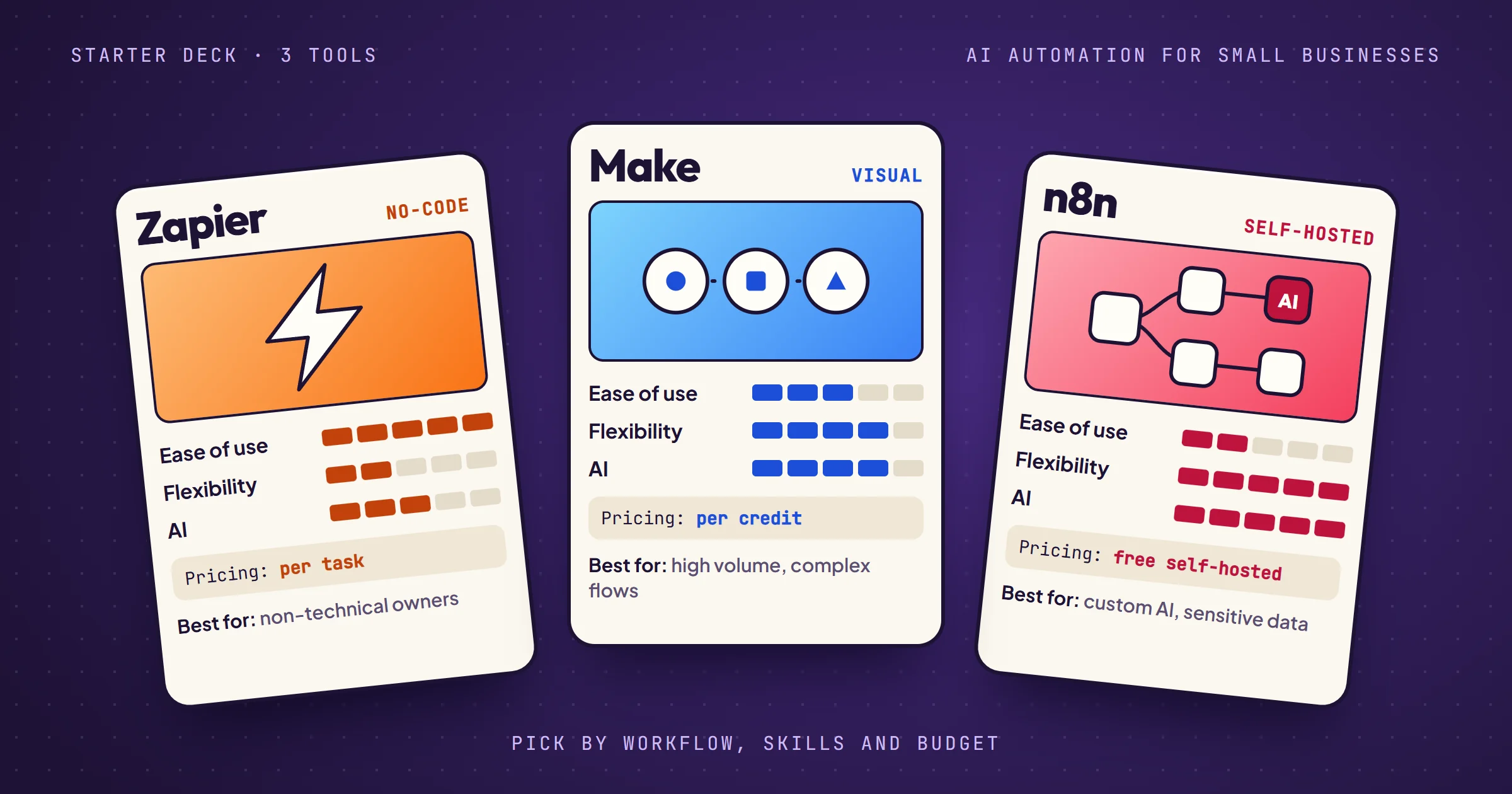
Here is a comparison of three popular AI automation tools for small businesses. The criteria are based on common needs: ease of use, flexibility, pricing model, and AI capabilities.
| Tool | Ease of Use | Flexibility | Pricing Model | AI Capabilities |
|---|---|---|---|---|
| Zapier | Very easy, no code required | Largest app library, less custom logic | Subscription based on tasks per month | Built-in AI steps and agents |
| Make | Moderate, visual but steeper learning curve | High, supports complex scenarios and custom functions | Subscription based on credits, cheaper for high volume | AI agents and modules, can integrate with OpenAI |
| n8n | More technical, requires some coding for advanced use | Very high, fair-code, self-hostable, custom code | Free self-hosted, paid cloud version | Can embed AI models, flexible with custom AI workflows |
This table is a starting point. Your choice will depend on your specific requirements. For instance, if you need to connect to a niche app, check the integration library of each tool. If you handle sensitive data, self-hosting n8n might be preferable. For a side-by-side that adds Power Automate and Node-RED, see our low code comparison.
Beyond Workflow Platforms: Chatbots, Documents and Industry Use Cases
AI chatbots
An AI chatbot answers customer questions from your own content: opening hours, order status, pricing, a first level of support. It earns its place when the same questions come back every day and the answers already exist somewhere in writing. Connected to a workflow platform, it can also act: create a ticket, book a slot, or hand over to a person when it is unsure.
Document processing
Document processing turns invoices, quotes, contracts or CVs into structured data. The AI reads the file and extracts the fields you need, then the workflow pushes them into your accounting tool or CRM. It is often a good first use of AI in a small business: the task is repetitive, the volume is steady, and an error is easy to spot.
Industry-specific use cases
- Agencies and consultants: watching the trade press for prospects. Our lead monitoring agent does it for an influence agent: 25 feeds read every weekday, each signal ranked into three tiers, and a brand seen three times in 30 days flagged as a hot prospect.
- Finance and reporting: turning raw data into a report. Our automated reporting pipeline scores each asset on five dimensions every week and publishes an HTML and a PDF report, with no manual step.
- Retail and e-commerce: order confirmations, stock alerts and review requests triggered by the shop itself.
- Trades and local services: quote follow-ups, appointment reminders and unpaid invoice chasers.
Common Mistakes to Avoid
Automating a broken process
One frequent mistake is automating a broken process. If your current workflow is inefficient, automating it will only make the inefficiency faster. Before choosing a tool, map out your processes and eliminate unnecessary steps.
Underestimating maintenance
Another pitfall is underestimating maintenance. Automations can break when APIs change or when your business evolves. You need someone responsible for monitoring and updating workflows. Without that, you risk silent failures that disrupt operations.
We see it on our own builds. Between July 12 and July 22, 2026, the lead monitoring agent above changed four times on the client's feedback: a wider filter ranked by tiers, a shorter report, his own labels instead of ours, and a weekday-only schedule. None of it was a bug. It was the workflow catching up with how he really works, and somebody had to be there to do it.
Over-automating
Also, avoid over-automating. Not every task should be automated. Some processes require human judgment or a personal touch. Automating customer interactions too aggressively can harm relationships. Use automation for repetitive, rule-based tasks, and leave complex decisions to people. On that same agent, the AI sorts and ranks, but the decision to call a brand stays with the client.
The Hidden Cost of Free Tools
Many AI automation tools offer free tiers or open-source versions. While attractive, these can have hidden costs. Free tiers often limit the number of tasks or integrations, forcing you to upgrade as you scale. Self-hosted tools like n8n require you to manage your own server, which means time and technical expertise.
Consider the total cost of ownership, not just the subscription price. Factor in the time spent learning the tool, building automations, and maintaining them. Sometimes a more expensive tool with better support and ease of use can be cheaper in the long run.
For example, a small business might choose n8n because it's free to self-host. But if the owner spends 10 hours a week managing the server and debugging workflows, that time could be better spent on revenue-generating activities. In that case, a paid tool like Zapier might be more cost-effective.
Our own numbers point the same way. One self-hosted n8n instance runs the production workflows of three of our projects, and the server is the small line on the bill. The time spent on updates and monitoring is the real one, which is what our copiloting covers for clients, from €100 excl. VAT per month.
How to Choose the Right Tool for Your Business
- Start by listing the apps you use daily and the tasks you want to automate. Check which tools have native integrations with those apps. If a tool lacks a needed integration, see if it supports webhooks or custom API calls.
- Next, assess your team's technical skills. If you have no one comfortable with code, prioritize ease of use. Zapier is known for its user-friendly interface. If you have a developer or a technically inclined person, n8n or Make offer more flexibility.
- Finally, think about scalability. As your business grows, your automation needs will evolve. Choose a tool that can handle increased volume and complexity without a steep jump in cost. Make's pricing is often more favorable for high-volume operations compared to Zapier.
Our cloud comparison explains when it is time to move from a no-code tool to n8n. For a deeper dive into integrating AI into your small business, see how we integrate AI step by step, from diagnostic to working MVP.
Frequently asked questions
Which AI automation tool is best for a non-technical small business owner?
Zapier is generally the easiest to use, with a straightforward interface and a large library of pre-built integrations. It requires no coding knowledge for most tasks.
Can I use AI automation tools for free?
Yes, many tools offer free tiers with limitations. n8n's community edition can be self-hosted for free, but you need to manage the infrastructure. Zapier and Make have free plans with limited tasks per month.
How do AI automation tools handle data privacy?
It varies. Cloud-based tools store your data on their servers, so you must trust their security measures. Self-hosted options like n8n give you full control over your data. Always review the tool's privacy policy and compliance certifications.
What is the difference between AI automation and regular automation?
Regular automation follows predefined rules, while AI automation can make decisions based on data. For example, a regular automation might send a fixed reply to every email, whereas an AI automation could analyze the email content and generate a personalized response.
Do I need a developer to set up AI automation?
Not necessarily. Many tools are designed for non-developers, with visual builders and templates. However, complex automations involving custom code or API integrations may require technical expertise.